

Recraft Review 2026: The Ultimate AI for Vector Art and Design
Recraft is a professional-grade AI design tool specifically built for creating and editing vector art, icons, illustrations, and 3D graphics. Unlike standard image generators, Recraft allows users to generate infinite-scale SVG files and maintain strict brand consistency across entire sets of assets. It is widely considered the premier tool for graphic designers who need production-ready outputs rather than just creative inspiration.
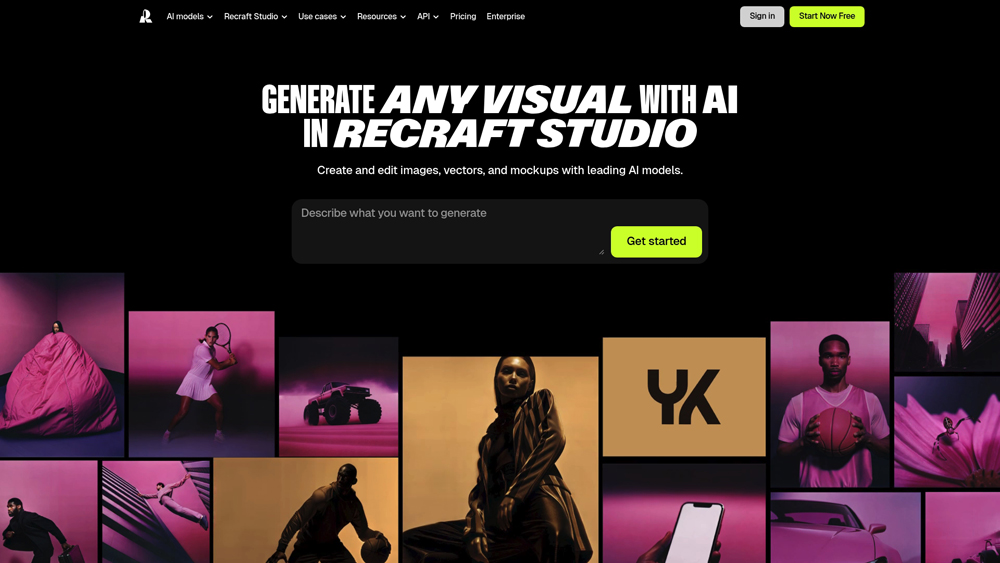
In-Depth Review & Design Analysis
Recraft.ai has emerged as a powerhouse for designers who require more control than Midjourney or DALL-E provide. We evaluate its performance based on vectorization quality, anatomical accuracy in illustrations, and the “Style Sets” feature which allows teams to create hundreds of icons or assets in a single, unified aesthetic. Our 2026 analysis confirms its dominance in the branding and UI/UX asset space.
Key Takeaways: Pros, Cons & Quick Summary
This summary highlights why Recraft is the top choice for vector-based professional design work in 2026.
Key Advantages (Pros)
- True Vector Output: The only AI that natively generates clean, editable SVG files for professional use.
- Style Consistency: Create “Style Sets” to ensure every icon or illustration matches your brand perfectly.
- Advanced Raster-to-Vector: Industry-leading vectorizer tool that converts pixel art into crisp geometric paths.
- Anatomical Precision: Recraft V3 excels at rendering complex hands, text, and human anatomy better than competitors.
- Designer-Centric UI: An infinite canvas interface that feels like a mix of Figma and Adobe Illustrator.
Potential Drawbacks (Cons)
- Learning Curve: The professional canvas tools may be slightly overwhelming for casual, one-click users.
- Niche Focus: While it does photography, its real power is in vector/graphic design, not hyper-realism.
- Credit Consumption: High-resolution batch vectorization can quickly deplete monthly credit allowances.
Core Features: Vector Mastery & Style Control
Recraft offers specialized tools that standard AI generators simply don’t have. For 2026, the focus is on production-ready assets that can be dropped directly into web, app, or print projects without further editing.
-
SVG & Vector Export: Unlike pixel-based AI, Recraft creates mathematical paths. This means you can scale a logo to the size of a billboard without any loss in quality.
-
Custom Brand Styles: You can upload your own brand assets to train the AI on your specific aesthetic, ensuring all future generations follow your company’s visual DNA.
-
AI Action Toolset: Includes built-in tools for background removal, image upscaling, generative fill, and an extremely precise “Lasso” for targeted area editing.
-
Recraft V3 Model: The latest model update significantly improved text rendering within images, allowing for posters and infographics with perfectly spelled, stylized typography.
Model Architecture & Core Innovation
Understanding the underlying generative engines (Recraft V3, Latent Diffusion) is critical to assessing design precision and stylistic limits. The innovation within these architectures directly impacts the quality of generated assets, from anatomical accuracy in illustrations to the mathematical cleanlines of vector paths.
- Recraft V3: This is the flagship model specifically optimized for graphic design and typography. It represents a breakthrough in “text-in-image” generation and anatomical correctness, allowing for complex illustrations with perfectly rendered hands and integrated, editable text.
- Vector Pipeline: Unlike standard models that only produce pixels, Recraft’s specialized architecture includes a native raster-to-vector engine. This translates neural generations into geometric Bezier curves, making it the only model designed for infinite scalability without quality loss.
- Style IDs & Consistency: Professional users benefit from the “Style Set” architecture. By training small, localized style weights, Recraft allows designers to maintain a 100% consistent aesthetic across thousands of different icons, illustrations, or brand assets.
Performance, Speed & User Experience (UX)
Performance testing focuses on generation latency, vectorization accuracy, and consistency across complex design tasks. The user experience is rated on the fluidity of the infinite canvas and the professional precision of the editing tools.
- Generation Latency: Recraft’s V3 model delivers high-fidelity previews in seconds. Even complex vectorization tasks are processed with near-instant feedback, which is essential for a fast-paced professional design workflow.
- User Interface & Design: The “Infinite Canvas” interface is a major UX win. It moves away from the “single prompt box” and feels more like a professional design tool (similar to Figma). This allows for non-linear workflows where you can see all variations and iterations of a project in one expansive view.
- Error Handling: The system is remarkably robust at interpreting design-specific prompts. If a prompt is stylistically ambiguous, the “Style Presets” and “Fine-tune” controls allow users to manually correct the direction, reducing the “trial and error” fatigue common in other AI tools.
Recraft Pricing & Professional Value (2026)
The latest Recraft V3 and Vectorizer Pro engines provide “designer-level” precision for brand assets. With a vast library of Community Styles, Private Mode, and the new Batch SVG Generation, it remains the most flexible tool for both solo freelancers and global design agencies.
FREEMost Popular$0
- Price: $0/mo
- Model: 50 Daily Credits
- Core: Standard Vector Access Plus Public Gallery Visibility and Basic Style Presets
- Best For: Hobbyist Designers and Students Testing Basic Vector Generation Logic
ADVANCEDMost Popular$48
- Price: $48/mo
- Model: 5,000 Credits / Mo
- Core: Shared Style Libraries Plus Batch SVG Processing and Priority Queue Support
- Best For: Small Design Agencies and Marketing Teams Managing Multiple Brand Identities
ENTERPRISEMost PopularCUSTOM
- Price: Custom
- Model: Unlimited Credits
- Core: Dedicated Style Training Plus SSO Security and Custom API Integration Access
- Best For: Large Scale Corporations and Global Marketing Houses Requiring Full Governance
Note: Recraft credits are consumed per generation; vectorizing an image typically costs more than a standard raster generation. Private Mode, which prevents your designs from appearing in the public community gallery, is restricted to paid tiers. Team plans allow for pooled credits and shared style sets. Always verify the latest “Top-up” credit rates in your account dashboard, as localized 2026 pricing and seasonal “Designer” discounts may apply.
Product Details
Recraft.ai is the first AI design platform built specifically for the professional graphic designer’s toolkit. Unlike traditional generators that produce flat pixels, Recraft specializes in native vector outputs and brand-consistent icon sets that are fully scalable and print-ready. We highly recommend it for design teams and freelancers who need an AI ‘co-pilot’ that integrates directly into a high-end production workflow without losing stylistic control.
Platforms Supported
- Cloud (Web-Canvas)
- Desktop (Mac/PC)
- iOS App
- Android App
Export Formats
- SVG (Vector)
- Lottie (Animation)
- PNG / JPG / WEBP
Support
- Priority Ticket Support
- Community Discord

Prompt Colleague Score
Quick Facts
- Company: Recraft, Inc.
- Best For: Professional Vector Art & Icon Systems
- Latest Model: Recraft V3 (Agentic Mode enabled)
- Output: Native SVG, Lottie, & High-Res Raster
- Security: SOC 2 Type 2 & AIUC-1 Certified
- HQ: London, UK
- Official Site: recraft.ai
Pricing & Access (2026)
- Free Tier: 30 Credits/day (Public gallery)
- Pro Tier: $10/mo (billed annually – Private mode)
- Advanced Tier: $27/mo (High credit volume)
- Teams: $55/mo (Centralized billing + SSO)
- Best Value: Pro Tier (Includes external model access)
Recraft.ai Frequently Asked Questions (FAQ)
Unlike Midjourney or DALL-E which produce pixels (raster), Recraft is built for designers. It allows you to generate true vector art (SVG) that can be scaled infinitely without pixelation, making it suitable for logos, print, and professional branding.
Yes, Recraft offers a generous free tier with 50 daily credits. You can access the infinite canvas and generate both raster and vector images, though your generations will be visible in the public community gallery unless you upgrade to a paid plan.
A Style Set allows you to define a specific aesthetic—like a specific line weight, color palette, or illustration style—and apply it to all future generations. This ensures that a set of 50 icons or 10 illustrations all look like they were drawn by the same artist.
No, on paid plans (Starter and Advanced), you own the full commercial rights to the images you create. On the free plan, you still have commercial rights, but the images must remain public for the community to see and remix.
Yes! Recraft features an industry-leading AI Vectorizer. You can upload any low-resolution raster image, and Recraft will trace it into a clean, high-fidelity SVG file with editable paths, which is a massive time-saver for logo cleanup.
Yes, with the release of Recraft V3, the model has gained significant text-rendering capabilities. You can now generate posters, labels, and icons that include specific, accurately spelled words integrated into the graphic design.
Recraft API & Professional Integration
The professional utility of Recraft extends into high-scale production through its robust API ecosystem. Powered by fal.ai and Replicate, the Recraft V3 API allows developers to integrate vector generation and raster-to-vector conversion directly into their own SaaS platforms. This enables automated branding workflows where logos and icons are generated programmatically based on user input, maintaining perfect brand consistency across thousands of unique assets.
Design-heavy organizations use these API endpoints to build internal tools for marketing automation, dynamic ad creation, and UI component generation. By utilizing Recraft’s unique ‘Style ID’ system via API, companies can ensure that every AI-generated asset across their entire global infrastructure follows a pre-approved, strictly defined visual language without human intervention.
Graphic Design & Branding Features:
- Vector Art Generation
- Logo Design System
- Brand Style Consistency
- App Icon Sets
- Infinite Canvas UI
- Custom Color Palettes
- Layers & Grouping
- Batch Exporting
- SVG / DXF Export
- Lottie Animations
- Generative Fill (In-painting)
- AI Upscaling (4K)
Illustration Styles:
- Flat Design Illustration
- 3D Render Style
- Hand-drawn Sketch
- Pixel Art Rendering
- Linocut & Engraving
- Watercolor Aesthetic
- Kawaii & Cartoon
- Photorealism (Advanced)
- Video Generation
- 3D Model Export (OBJ)
- Character Rigging
- Automatic Layouting
Professional Designer Workflow:
- Image-to-Vector Tracing
- Color Palette Extraction
- Lasso Tool Selection
- Background Removal
- Region-based Editing
- Style Reference Uploads
- Collaboration Canvas
- Design Versioning
- Community Remixing
- Precise Anatomical Fixing
- Voice Control Interface
- Automated Web Deployment
- Direct Adobe Plugin
AI-Driven Design Innovation:
- Vectorizer Pro
- Generative Outpainting
- Style Transfer
- Typography Integration
- Mockup Generation
- Asset Personalization
- Multi-format Synthesis
- AI-Powered Print Preview
Vector Intelligence:
- Bezier Curve Optimization
- Path Smoothing
- Geometric Node Reduction
- Layer-Based Masking
- Global Style Consistency
- Real-Time SVG Rendering
- Manual Path Editing
- Font Substitution AI
- 3D SVG Depth Mapping
- Auto-Coloring Vectors
Product Features In Detail:
Beyond a standard image generator, Recraft.ai acts as a professional design studio on an infinite canvas. This detailed feature breakdown explores how designers use Recraft V3 to solve complex branding problems, from maintaining style consistency across thousands of icons to generating high-fidelity vector art that is ready for production. Whether you are a solo freelancer or part of a global agency, these tools are designed to remove the friction from the digital illustration and graphic design process.
The newest Recraft V3 model is the engine behind the platform’s incredible graphic design accuracy. It understands professional design terminology like ‘kerning’, ‘line-weight’, and ‘flat design’, producing visuals that aren’t just pretty but follow actual design principles.
Recraft’s vectorizer is widely considered the best in class. It allows you to take any low-quality raster image—like an old logo or a quick AI sketch—and transform it into clean, geometric vector paths (SVG) that can be edited in Illustrator or Figma.
Recraft doesn’t limit you to a single square. It uses an infinite canvas where you can generate, arrange, and edit hundreds of images simultaneously. This workspace is perfect for creating whole icon sets, storyboards, or entire brand visual identities in one place.
You have total control over the colors. You can upload your brand’s specific hex codes, and Recraft will ensure that every single generation—whether it’s a 3D illustration or a simple icon—strictly adheres to your color scheme.
If you love a design but want to change one small detail, the Lasso and Eraser tools allow you to modify specific regions. You can replace a character’s clothing, change an object in the background, or add new elements while keeping the style consistent.
The most powerful tool for branding. You can save your favorite generations as a ‘Style’, allowing you to generate new assets weeks later that look identical in style, weight, and texture to your original work.
Recraft allows you to see your designs in the real world. You can automatically place your generated logos or patterns onto T-shirts, packaging, or digital screens to see how they perform in a commercial context before exporting.
Recraft supports a wide range of professional formats beyond PNG. You can export in SVG for vectors, Lottie for web animations, or high-resolution 4K rasters with transparent backgrounds, ready for any professional workflow.
The Top 4 AI Tools: Our Editors' Picks for Instant Productivity!

ChatGPT
AI Assistants

Google Gemini
AI Assistants

Midjourney
Image Generators

Otter.ai
Meeting Assistants