

Otter AI Review 2026: The Leading AI Meeting Assistant & Notetaker
Otter AI is an advanced transcription and meeting intelligence platform designed to automate note-taking for virtual and in-person conversations. By integrating directly with Zoom, Google Meet, and Microsoft Teams, Otter captures real-time audio, identifies speakers, and generates automated summaries with actionable items. It empowers teams to stay focused on the discussion rather than the documentation, providing a searchable “corporate memory” for every interaction across the organization.
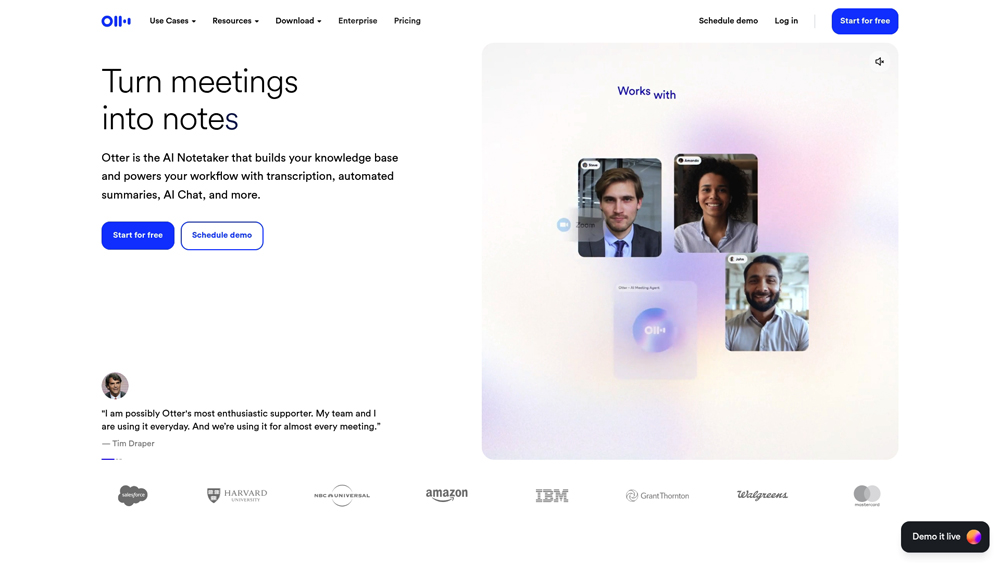
In-Depth Review & Workspace Analysis
Otter AI has evolved from a simple transcription app into a sophisticated “Meeting GenAI” ecosystem. We evaluate its primary strengths across live transcription accuracy, calendar integration, and its new “OtterChat” capabilities which allow users to query their entire meeting history. With the 2026 update, Otter has moved deeper into sales and enterprise workflows, offering specialized agents for CRM synchronization and automated follow-ups.
Key Takeaways: Pros, Cons & Quick Summary
This quick summary provides the core advantages and potential drawbacks of using Otter AI for professional meeting management.
Key Advantages (Pros)
- Best-in-Class Live Transcription: Near-instant text generation during live calls with high English accuracy.
- Autonomous OtterPilot: Automatically joins Zoom/Meet/Teams calls even if you are late or absent.
- Deep CRM Integration: Seamlessly pushes meeting notes and action items to Salesforce, HubSpot, and Slack.
- Multi-Meeting Chat: Ask “OtterChat” questions across multiple previous meetings to find specific details.
- Mobile Optimization: Excellent iOS/Android apps for transcribing in-person lectures and interviews.
Potential Drawbacks (Cons)
- Limited Language Support: Primarily optimized for English; struggles with complex accents or non-supported languages.
- Strict File Upload Limits: Free and Pro tiers have rigid monthly caps on importing pre-recorded audio/video files.
- Video Behind Enterprise Paywall: Full video playback and “Video Replay” features often require the highest-tier plans.
Core Features: OtterPilot, AI Chat & Workflow Automation
Otter AI offers a robust toolset that transforms voice data into structured business intelligence. For 2026, the focus has shifted from simple “speech-to-text” to “speech-to-workflow,” where the AI actively manages the post-meeting lifecycle.
-
OtterPilot for Meetings: A virtual assistant that connects to your calendar and automatically attends meetings to record, transcribe, and share summaries with all participants.
-
AI-Powered Search & OtterChat: A conversational interface where you can ask, “What were the project deadlines mentioned last week?” and get answers cited from across your entire transcript library.
-
Automated Action Items: Proprietary AI models identify commitments and tasks within the conversation, tagging responsible parties and syncing them with project management tools like Jira and Asana.
-
Custom Vocabulary & Speaker ID: Tailor the engine to recognize industry-specific jargon and learn the unique voices of your team members for highly accurate speaker attribution.
-
Model Context Protocol (MCP) Support: New for 2026, Otter can now feed meeting intelligence directly into other AI systems like Claude or custom enterprise LLMs for broader context.
AI Intelligence & Knowledge Management
Otter’s 2026 architecture utilizes multi-modal analysis to understand not just what was said, but the context of the meeting environment. This includes capturing slide screenshots during virtual calls to provide visual anchors for the transcript.
- Dynamic Summarization: Unlike generic AI summaries, Otter adapts its recap style based on meeting type—Sales calls focus on deal risk, while Standups focus on blockers and progress.
- Agentic AI Workflows: Otter’s “Sales Notetaker” can now automatically update specific CRM fields in Salesforce or HubSpot based on the conversation, reducing manual data entry for reps.
- Data Retention & Compliance: Enterprise users benefit from granular data governance, HIPAA compliance, and the ability to redact sensitive information automatically.
Performance, Latency & Connectivity
In our testing, Otter AI maintains a significant edge in real-time responsiveness. The “Live Transcript” feature allows attendees to follow along and highlight text during the call, which is a major benefit for accessibility.
- Transcription Latency: Otter delivers text with less than 2-second delay during live recording, making it one of the most reliable tools for live-captioning environments.
- Platform Stability: The “Botless” recording option for Google Meet (via Chrome Extension) provides a less invasive way to capture audio without a visible participant in the room.
- Integration Ecosystem: With over 30+ native integrations, Otter functions as a bridge between voice communication and the rest of your tech stack (Slack, Notion, Dropbox, etc.).
Otter AI Pricing & Professional Value
Otter AI offers tiered plans designed to scale with your meeting volume. While the Free tier is great for occasional users, the Business and Enterprise plans unlock the true power of AI-driven CRM automation and organizational-wide search.
BASICMost PopularFREE FOREVER
- Price: $0/mo
- Minutes: 300 Monthly
- Cap: 30 Min/Meeting
- Best For: Students & Casuals
BUSINESSMost PopularTEAM HUB
- Price: $20/mo
- Minutes: 6,000 Monthly
- Admin: Usage Analytics
- Best For: SMB Teams
ENTERPRISEMost PopularFULL SCALE
- Price: Custom
- Video: Video Replays
- Security: SSO & HIPAA
- Best For: Large Corporations
Note: Otter AI pricing reflects annual billing discounts. Monthly subscriptions for Pro and Business tiers are higher. Enterprise rates are negotiable based on seat volume and specific compliance requirements. Features like the “Otter Sales Notetaker” may require specific workspace configurations. Always verify the latest costs at otter.ai/pricing before purchasing.
Product Details
Otter AI remains the market leader for specialized meeting intelligence. It offers the best balance of live transcription speed and workflow automation for users who spend significant time in virtual conferences or interviews.
Platforms Supported
- Web (Cloud)
- Chrome Extension
- Desktop App
- iPhone
- iPad
- Android
Training
- Knowledge Base
- Video Tutorials
Support
- Help Center
- Priority Email

Prompt Colleague Score
Quick Facts
- Company: Otter.ai
- Best For: Real-time Hybrid Meeting Intelligence
- Latest Engine: OtterPilot Agentic Suite
- Core Tech: Multi-Meeting Context Retrieval
- Platform: Zoom, Teams, Meet, & In-Person
- Compliance: SOC2 Type II, HIPAA (Enterprise)
- Official Site: otter.ai
Pricing & Access (2026)
- Basic: $0 (300 mins, 30 min/cap)
- Pro: $8.33/mo* (1,200 mins, 10 imports)
- Business: $20/mo* (6,000 mins, Admin tools)
- Enterprise: Custom (Unlimited, HIPAA)
- Best Value: Pro Annual Subscription
Frequently Asked Questions (FAQ)
Otter AI generally achieves up to 95% accuracy in clear audio environments. It excels at technical terminology and professional English, though accuracy may dip in meetings with significant background noise or overlapping speakers.
Yes, Otter offers a Basic free tier. In 2026, this includes 300 monthly transcription minutes with a 30-minute cap per conversation. It allows for basic AI Chat but limits the number of historical meetings you can query.
Otter primarily focuses on English (US/UK), but now supports Spanish, French, and Japanese. Unlike some competitors that support 50+ languages, Otter prioritizes deep accuracy and real-time speed in its core supported dialects.
Yes, through the ‘OtterPilot’ feature. Once you connect your Google or Outlook calendar, the AI agent will automatically join Zoom, Microsoft Teams, and Google Meet calls to record and summarize them without manual intervention.
Otter uses SOC 2 Type II compliance and end-to-end encryption. On Enterprise plans, your meeting data is not used for training their global models, and they offer specialized features like HIPAA compliance for healthcare users.
Advanced Mode allows the AI to use complex reasoning to answer questions across multiple past meetings. It can spot trends in projects over months of conversations, rather than just summarizing a single session.
Otter AI Enterprise & API Features
The professional utility of Otter AI has expanded into the ‘OtterPilot for Sales’ ecosystem, offering deep CRM integrations with Salesforce and HubSpot. By programmatically pushing meeting insights and action items directly into sales pipelines, Otter eliminates manual data entry for revenue teams. This agentic workflow ensures that client needs are tracked accurately across global infrastructures without human error.
For developers and large-scale enterprises, Otter’s API provides the ability to transcribe massive archives of legacy audio and video files. The infrastructure supports high-concurrency processing, allowing organizations to index thousands of hours of internal data, making it searchable and actionable through a centralized knowledge graph that integrates with existing Slack and Jira workflows.
Meeting Intelligence Features:
- Real-time Notetaker
- For Healthcare (HIPAA)
- For Sales (CRM Sync)
- For Education
- Automated Summaries
- Natural Language Search
- Action Item Extraction
- Virtual Meeting Agent
- Speaker Identification
- Custom Vocabulary
- Cross-Meeting Reasoning
- In-Person Recording
Transcription Engine:
- Machine Learning
- NLP Transcription
- Timestamp Syncing
- Live Captions
- Audio-to-Text Search
- Vocabulary Learning
- Cloud File Import
- Real-time Translation
- 50+ Languages
- Human Proofreading
- Native Desktop App
- Video Recording
Conversational AI & Interaction:
- Intent Recognition
- Spanish/French Support
- Live Otter Chat
- Pre-configured Bots
- Sentiment Analysis
- Multi-Meeting Analytics
- Long-Term Memory
- Voice Command Prompts
- Automated Follow-up Emails
- Tagging & Mentions
- Speech Synthesis
- Multilingual Recording
- Virtual Avatar Rendering
Reporting & Logic:
- Action Item Tracker
- Meeting Sentiment
- Word Clouds
- Decision Tracking
- Project Timelines
- Context-Aware Notes
- Slack Integration
- Advanced Data Graphs
Natural Language Processing (Meeting Focus):
- Speaker Diarization
- Filler Word Removal
- Tone & Emotion Logic
- Topic Clustering
- Contextual Recall
- Neural Text Alignment
- Dialect Adaptation
- Syntactic Parsing
- Part-of-Speech Tagging
- Automatic Redaction
Product Features In Detail:
As a leading AI meeting assistant, Otter AI provides a specialized suite of tools designed to handle the entire meeting lifecycle. From real-time captioning to post-meeting automated follow-ups, these features enable teams to focus on conversation rather than transcription. This section explores the deep technical capabilities of the 2026 Otter ecosystem, including its new voice-prompted agents and cross-platform intelligence.
The core of the platform is the OtterPilot, an autonomous agent that joins Zoom, Teams, and Google Meet. It doesn’t just record; it captures slides in real-time, tags participants, and produces a live-scrollable transcript that allows late arrivals to catch up instantly.
New for 2026, users can interact with their meeting transcript using verbal commands. By saying “Hey Otter, what was the deadline mentioned earlier?”, the AI will search the current and past transcripts to provide an immediate spoken answer and a cited text reference.
Different meetings require different summary styles. Otter allows you to set templates for Sales Calls (focusing on objections and pricing), Team Syncs (focusing on blockers and tasks), or Interviews (focusing on candidate skills and answers).
Otter provides centralized billing and advanced usage analytics for large teams. It features domain capture (automatically adding anyone from your company domain), SSO, and data deletion policies that meet SOC 2 and GDPR requirements.
Otter Chat now features ‘Express’ and ‘Advanced’ modes. Advanced mode uses deep reasoning to answer complex questions that span multiple months of conversations, helping you identify project patterns or recurring client issues over time.
For revenue teams, Otter automatically extracts sales-specific insights (like BANT criteria) and pushes them to Salesforce or HubSpot. This reduces the time reps spend on admin work and ensures sales data is always current and accurate.
Otter works across web browsers, iOS, and Android, and includes a specialized Chrome Extension. This allows for seamless recording of in-person huddles at the office or virtual meetings on the go, with all data synced to a single searchable cloud library.
Otter organizes transcripts into Channels (e.g., #Marketing or #Project-X). Team members can highlight text, add comments, and assign action items directly within the transcript, turning meeting notes into a living project management tool.
The Top 4 AI Tools: Our Editors' Picks for Instant Productivity!

ChatGPT
AI Assistants

Google Gemini
AI Assistants

Midjourney
Image Generators

Otter.ai
Meeting Assistants