

FlutterFlow Review 2026: The Leading Edge of AI-Assisted Visual App Design
FlutterFlow is a premier low-code application builder that leverages advanced AI-driven by Gemini and OpenAI integrations to revolutionize the mobile and web development lifecycle. In 2026, it stands as the industry standard for visual-first development and seamless multi-platform deployment. The platform empowers creators to move from UI design to production-ready Flutter code in minutes, offering a browser-based canvas that eliminates the complexity of manual coding. With its deeply integrated AI Gen capabilities, FlutterFlow has transformed into a robust, AI-first ecosystem for modern product teams.
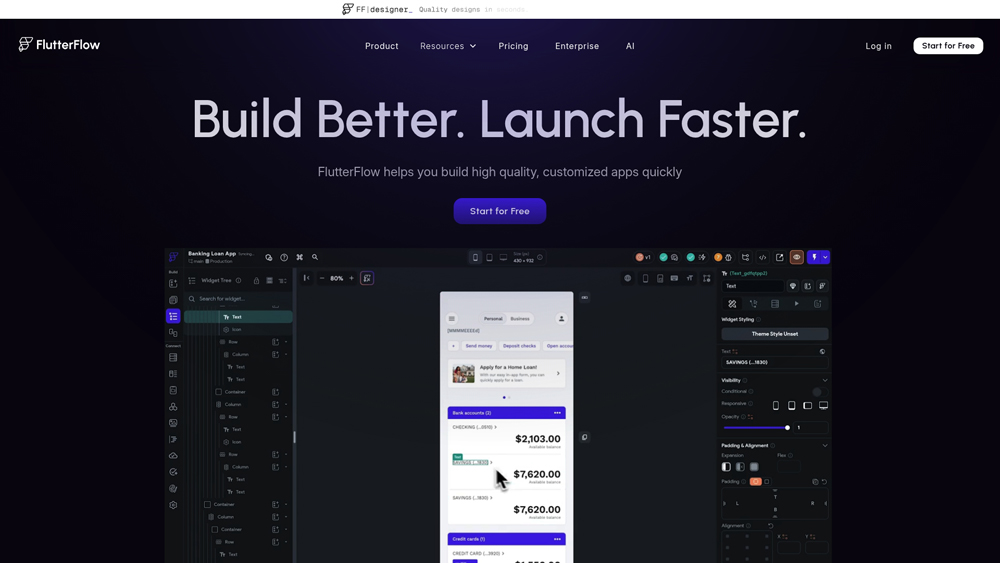
In-Depth Review & Model Analysis
FlutterFlow has effectively bridged the gap between visual design and enterprise-grade performance. We evaluate its performance across development speed, Gemini-driven reasoning depth, and the reliability of its one-click deployment. In 2026, FlutterFlow’s reliance on OpenAI and Google Gemini for logic generation has made it the primary choice for teams who prioritize iteration speed without sacrificing code quality.
Key Takeaways: Pros, Cons & Quick Summary
This summary highlights the operational strengths and current limitations of the FlutterFlow ecosystem for professional app development.
Key Advantages (Pros)
- Gemini & OpenAI Integration: AI Gen manages complex logic generation and autonomous API binding.
- Cross-Platform Mastery: Simultaneously build for iOS, Android, Web, and Desktop from one project.
- Visual Action Flow: Build complex backend logic visually without writing traditional Dart code.
- Firebase & Supabase Sync: Native, deep integrations for instant database and auth setup.
- Code Export: Full access to underlying Flutter code, ensuring no vendor lock-in.
Potential Drawbacks (Cons)
- Learning Curve: Advanced features require a solid understanding of app architecture and logic flows.
- Complexity Limits: Extremely niche custom native functions may still require manual IDE work.
- Dependency on Ecosystem: Updates to Flutter or Firebase can occasionally require workspace adjustments.
Core Features: AI Gen & Visual Workflows
FlutterFlow’s feature set is anchored by its AI-first approach to low-code development. We focus on the capabilities that define its professional utility, particularly the Gemini-powered AI Gen and the visual Action Flow system.
-
AI Gen Pro: A state-of-the-art assistant that builds entire UI pages, generates custom functions, and suggests database schemas via natural language prompts.
-
Visual Action Builder: An intuitive interface for creating complex app logic and conditional workflows without manual coding.
-
One-Click Deployment: A seamless pipeline for pushing apps to the App Store, Google Play, and web domains directly from the canvas.
-
Custom Widget Support: Provides the flexibility to import any Flutter package, ensuring you are never limited by the visual builder.
-
FlutterFlow Teams: Dedicated collaborative workspaces with real-time editing, version control, and shared design systems.
Cloud Infrastructure & AI Architecture
The technical foundation of FlutterFlow combines the power of Google Cloud with the reasoning of the world’s most advanced AI models.
-
Google Gemini Integration: Optimized specifically for generating high-quality Flutter/Dart code and multi-modal asset creation.
-
OpenAI Reasoning: Leveraging GPT-4o for complex architectural planning and autonomous logic debugging.
-
Firebase Native: Deep, serverless infrastructure that provides real-time data sync and instant scalability for any project size.
Performance, Speed & User Experience (UX)
Performance testing for FlutterFlow focuses on project load times, canvas responsiveness, and the accuracy of AI Gen across diverse app categories. The user experience is rated on the platform’s “logic-first” philosophy and the intelligence of its integrated app lifecycle.
-
Canvas & Runtime Latency: FlutterFlow’s cloud infrastructure ensures that the visual editor remains smooth even with hundreds of pages. The 2026 updates have optimized AI response times to sub-500ms, maintaining a “flow state” for designers.
-
User Interface & Design: The interface follows a “clean and professional” layout. By moving complex backend settings and API management into intuitive sidebars, FlutterFlow minimizes cognitive load, allowing users to move from design to a live app via a single “Publish” button.
-
Autonomous Debugging: FlutterFlow’s AI Debugger excels at self-correction. When the system detects a logic error or a missing variable, it doesn’t just show an error; it suggests the specific AI-generated fix to resolve the issue instantly.
FlutterFlow: 2026 App Builder Pricing
The latest Gemini and OpenAI-powered AI Gen provide “human-level” autonomy for complex app development and debugging. With a vast library of Templates, integrated Deployment pipelines, and new AI-powered UI generation, it remains the most flexible tool for both beginners and professional developers.
FREEMost Popular$0
- Price: $0/mo
- Model: 2 Project Limit
- Core: Full Visual Builder Plus 1,000+ Prebuilt Templates and Five Lifetime AI Requests
- Best For: Individual Students and Hobbyists Exploring Basic App Building Foundational Logic
BASICMost Popular$39
- Price: $39/mo
- Model: Unlimited Projects
- Core: Code and APK Downloads Plus Custom Domain Publishing and 50 Monthly AI Requests
- Best For: Solo Developers and Independent Makers Building Professional Grade Custom MVPs
BUSINESSMost Popular$150
- Price: $150/mo
- Model: 5 User Collab
- Core: Advanced Project Branching Plus Automated Testing and 500 Monthly AI Requests
- Best For: Product Teams and Agencies Managing High-Volume Complex Multi-User Environments
Note: FlutterFlow moved to a seat-based model in late 2025; “Growth” and “Business” plans now scale based on the number of editors and require separate billing for “Single Project Collaborator” passes. While FlutterFlow provides the frontend, you must budget separately for your backend (Firebase Blaze plan or Supabase) and any AI Agent usage beyond your monthly credit allowance. Always verify current “AI Generation” caps and localized regional discounts in your FlutterFlow Dashboard, as tiered feature access is subject to the 2026 roadmap updates.
Product Details
FlutterFlow represents the next evolution of visual development, offering professional-grade power without the usual low-code limitations. It is uniquely capable of producing clean, exportable code while maintaining a high-velocity visual interface. It’s the perfect solution for teams that refuse to compromise on app performance or custom logic.
Platforms Supported
- Cloud (Web-Based)
- Windows Desktop
- Mac Desktop
- iOS & Android Apps
- Web (PWAs)
Training
- FlutterFlow University
- Community Marketplace
- Step-by-Step Tutorials
Support
- Extensive Docs
- Community Forum
- Direct Chat Support

Prompt Colleague Score
Quick Facts
- Company: FlutterFlow Inc.
- CEO: Abel Mengistu
- Best For: High-Performance Native iOS, Android & Desktop
- Core Tech: Flutter 3.3x & Google Gemini 2.0
- Latest Update: Agentic Action Flows & Pin Versioning
- Ecosystem: Firebase, Supabase, SQLite, & GraphQL
- Official Site: flutterflow.io
Pricing & Access (2026)
- Free Tier: Build & Test (No Store Deployment)
- Basic: $39/mo (Unlimited Projects + APK Download)
- Growth: $80/mo (GitHub Sync + One-Click Store Deploy)
- Business: $150/mo (SSO + Enterprise Data Connectors)
- Best Value: Growth (Standard for serious developers)
Frequently Asked Questions (FAQ)
FlutterFlow uses a multi-model approach. Google Gemini is the primary engine for Flutter code generation and UI suggestions, while OpenAI’s models are leveraged for complex logical reasoning, autonomous app debugging, and architectural planning within the AI Gen interface.
Yes, FlutterFlow offers a robust free tier that allows you to build, preview, and connect to Firebase. However, downloading source code, exporting APKs, and one-click publishing to the App Store/Google Play require a paid subscription (Growth or Business tiers).
Absolutely. Unlike many ‘no-code’ tools, FlutterFlow generates standard, high-quality Flutter/Dart code. You can export the code at any time and run it in VS Code or Android Studio, ensuring no vendor lock-in and enterprise-level scalability.
Yes. You retain full ownership of the code and assets generated within FlutterFlow. Because you can export the raw code, you are not dependent on FlutterFlow’s servers to keep your application running in the future.
AI Gen Agents allow you to prompt entire features into existence. Instead of building a login page or a profile screen manually, you can describe the functionality, and the AI agent autonomously builds the UI, sets up the variables, and binds the backend logic.
Yes, the Teams and Business plans include ‘Multiplayer’ mode. This allows multiple designers and developers to work on the same project simultaneously, seeing each other’s changes in real-time, similar to Figma but for functional apps.
FlutterFlow AI & Cloud Ecosystem
The true professional utility of FlutterFlow extends beyond the visual canvas. Its integration with the Google Cloud and OpenAI ecosystems provides direct access to state-of-the-art agentic workflows. By leveraging advanced AI Gen reasoning, developers can now automate the creation of custom cloud functions and complex API wrappers, enabling a new class of autonomous applications. This approach is essential for modern businesses requiring rapid deployment, massive multi-platform scale, and real-time data processing across global infrastructures.
Development teams use FlutterFlow’s extensible architecture to build proprietary, AI-powered mobile solutions, automate complex database migrations, and integrate sophisticated logic directly into their apps. The platform’s robust synchronization with GitHub and Firebase ensures that it remains the foundational core of modern, integrated app development across all industries, from fintech to healthcare.
App Development & AI Capabilities:
- Visual UI Builder
- For iOS & Android
- Enterprise SaaS
- eCommerce Solutions
- Multi-Language Support
- AI-Powered Code Gen
- Logic/Workflow Automation
- Custom API Integrations
- Image & Asset Management
- Agentic Build Flows
- Visual Logic Reasoning
- Firebase/Supabase Native
Engineering Features:
- Machine Learning Ops
- Dart Code Generation
- State Management
- Git/GitHub Integration
- Localization & Translation
- AI Debugger & Refactoring
- Dynamic Content Binding
- Push Notifications
- App Store Deployment
- Autonomous App Testing
- Analytics Dashboards
- In-App Purchases
Product Features In Detail:
Beyond its visual canvas, FlutterFlow functions as a professional-grade development environment tailored for modern app engineering. This section demonstrates how developers leverage FlutterFlow for specialized tasks, including UI architecture, AI-driven logic generation, and automated cloud deployments, essential for maximizing production value across all project types.
FlutterFlow’s AI Gen is an ‘Omni’ assistant that manages the visual-to-logic pipeline. It can generate complete UI components, listen to design requirements via prompt, and even generate custom Dart functions to handle complex mathematical operations or data formatting.
A standout feature is the native backend integration. You can deploy live databases, authentication systems, and cloud storage in minutes. The AI assistant can then autonomously bind your UI elements to these data sources with no manual wiring required.
The FlutterFlow Marketplace allows users to access thousands of pre-built custom widgets, UI kits, and full app templates. This ecosystem dramatically speeds up initial development, allowing teams to focus on unique business logic rather than basic scaffolding.
For complex integrations, FlutterFlow’s AI can analyze external API documentation and autonomously create the necessary code wrappers and data structures within your app, reducing days of manual integration work to mere seconds.
The ‘Multiplayer’ workspace allows for real-time collaboration. Designers can tweak the UI while developers build the logic in the same view. This eliminates the ‘handoff’ friction common in traditional development cycles.
FlutterFlow offers deep integration with GitHub, allowing for branching, merging, and standard version control. This makes it suitable for large-scale engineering teams that need to maintain code integrity across multiple contributors.
The platform handles the complexity of app store certificates and deployment pipelines. With a single click, you can push your build to TestFlight, the Google Play Console, or a live web domain, managed entirely by FlutterFlow’s cloud infra.
Utilizing ‘Chain of Thought’ processing via OpenAI/Gemini, the AI can solve complex architectural problems, such as optimizing data fetches or resolving state management conflicts, ensuring your app runs efficiently on all devices.
The Top 4 AI Tools: Our Editors' Picks for Instant Productivity!

ChatGPT
AI Assistants

Google Gemini
AI Assistants

Midjourney
Image Generators

Otter.ai
Meeting Assistants