

tl;dv Review 2026: The Best AI Meeting Recorder for Zoom, Meet & Teams
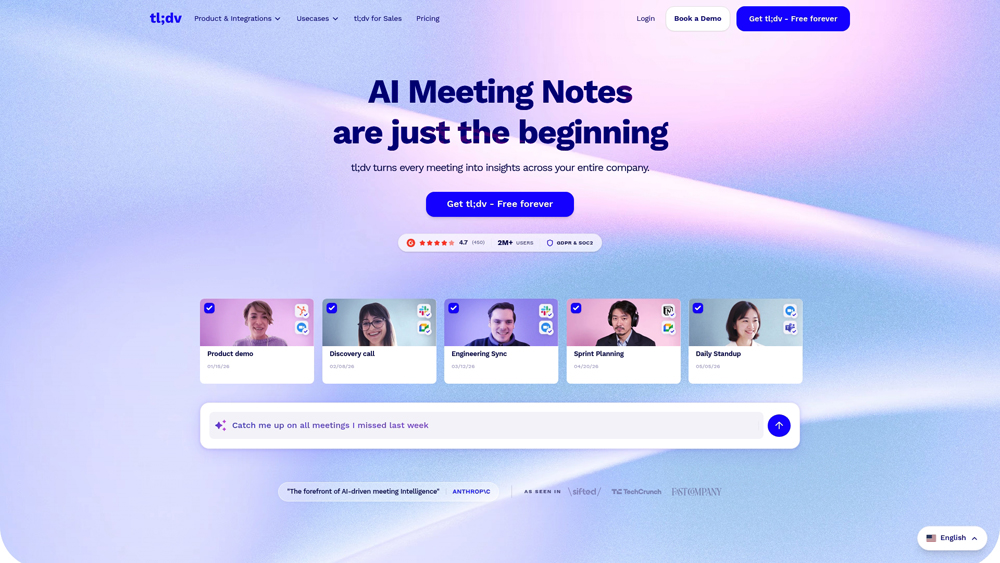
tl;dv is a powerful AI-driven meeting recorder designed to catch every detail of your Zoom, Google Meet, and Microsoft Teams calls. It automatically records, transcribes, and summarizes meetings, allowing teams to skip the call but stay in the loop. Known for its generous free tier and playful brand, tl;dv focuses on making meeting insights instantly shareable through “clips” and searchable archives, making it a favorite for product, UX, and customer-facing teams.
In-Depth Review & Performance Analysis
tl;dv has carved out a unique space in the AI meeting assistant market by focusing on “shareability.” While many tools focus on sales coaching, tl;dv is built for the entire organization. We evaluate its performance based on transcription accuracy across 30+ languages, the quality of its AI-generated meeting summaries, and how seamlessly it integrates into existing workflows like Slack, Notion, and HubSpot.
Key Takeaways: Pros, Cons & Quick Summary
This summary outlines why tl;dv is a top choice for remote teams and where it might face limitations compared to enterprise sales tools.
Key Advantages (Pros)
- Extensive Free Tier: Offers unlimited recordings and transcripts for free, which is rare in this category.
- Multilingual Support: Supports over 30 languages with high transcription accuracy and translation features.
- Instant Highlight Clips: Easily “cut” specific moments from a meeting to share with teammates via a simple URL.
- Deep Notion/Slack Sync: Automatically pushes meeting summaries and action items into your team’s documentation hub.
- User-Friendly Interface: A clean, intuitive dashboard that makes searching through months of calls effortless.
Potential Drawbacks (Cons)
- Sales Features: Lacks some of the advanced revenue intelligence (like deal risk scores) found in tools like Gong or Avoma.
- Bot Presence: Like most recorders, it requires a “bot” to join the meeting, which may not suit all executive cultures.
- Integration Gaps: While strong for tech stacks (Slack/Notion), some niche enterprise CRMs may require Zapier workarounds.
Core Features: AI Summaries & Global Meeting Search
tl;dv is built on the philosophy that you shouldn’t have to watch a whole meeting to get what you need. It leverages GPT-4o based summaries to provide context-aware notes that feel like they were written by a human teammate.
-
AI Meeting Notes: Automatically generates summarized meeting minutes, highlighting key decisions and action items without any manual input needed during the call.
-
Global Keyword Search: Search through your entire history of meetings. If a client mentioned “pricing” six months ago, tl;dv will find the exact second they said it across any recorded call.
-
Video Highlighting & Clipping: The most popular feature; simply highlight a piece of the transcript to create a “bite-sized” video clip that can be shared instantly in Slack or Notion.
-
Automated Workflows: Set up triggers to automatically send summaries to specific Slack channels based on keywords or meeting types (e.g., all “Discovery Calls” go to the sales-leads channel).
-
Cross-Platform Consistency: Works seamlessly across Zoom, Google Meet, and Microsoft Teams, ensuring your meeting data is centralized regardless of which platform the client uses.
Transcription Engine & Language Innovation
The “magic” of tl;dv is its ability to understand global teams. Its transcription engine is designed to handle accents and technical jargon across a wide variety of industries, from software development to medical research.
- 30+ Languages: Transcribe meetings in dozens of languages. You can even record a meeting in German and have the AI generate the summary in English for your global headquarters.
- Speaker Identification: Accurately identifies who is speaking, allowing you to filter the transcript by person—essential for analyzing interview feedback or client requirements.
- Privacy and Compliance: tl;dv offers SOC 2 compliance and features like “Private Folders,” ensuring that sensitive internal meetings are only accessible to authorized personnel.
Performance & User Experience (UX)
tl;dv is often cited as having the “coolest” UX in the category. It avoids the dry, corporate feel of traditional sales software, focusing instead on speed and viral sharing within a team.
- Processing Speed: Meetings are typically processed and available for review within minutes of the call ending, including the full AI summary and highlight capabilities.
- Ease of Setup: One-click integration with Google or Microsoft calendars. The bot joins automatically, so you never have to remember to hit “record.”
- Collaborative Editing: Teammates can add comments directly to the meeting timeline, turning a recorded call into a collaborative document for project management.
tl;dv Pricing & Professional Value (2026)
The 2026 pricing model for tl;dv remains one of the most generous in the industry. While the Free Tier is exceptionally capable for individuals, the Pro and Enterprise plans unlock the deep CRM integrations and global administrative controls that scaling teams need.
FREEFREE TIER$0
- Price: $0/mo
- Calls: Unlimited Record
- Transcripts: Unlimited
- Best For: Individuals
BUSINESSTEAM PLAN~$29
- Price: ~$29/user/mo
- CRM: Salesforce & HubSpot
- Analytics: Global Search
- Best For: Sales & Success
ENTERPRISEENTERPRISECUSTOM
- Price: Contact Sales
- Security: SSO & Compliance
- Admin: Centralized Billing
- Best For: Large Orgs
Note: tl;dv pricing is tiered based on feature access. While the free tier is extremely generous for recording, advanced CRM automation (pushing notes to HubSpot/Salesforce) and customized AI templates typically require a Business or Enterprise subscription. Verified pricing is available at tldv.io/pricing.
Product Details
tl;dv is a standout choice for teams that live in Zoom or Google Meet and need a reliable way to document and share insights without manual effort. Its focus on user experience and viral “clips” makes it the best tool for product managers and researchers who need to bring the voice of the customer into their documents.
Platforms Supported
- Cloud / Web
- Google Chrome Extension
- Desktop App (Windows/Mac)
- Zoom App Marketplace
Training
- Video Tutorials
- Knowledge Base
- Webinars
Support
- Live Chat
- Email Support
- Priority (Pro/Biz)
Prompt Colleague Score
Quick Facts
- Company: tldx Solutions GmbH
- Best For: Video Highlights & Multi-Meeting Trends
- Latest Engine: GPT-4.5 / Claude 3.5 Sonnet
- Key Feature: “Global Search” across all archives
- Language Support: 30+ Languages
- Headquarters: Aachen, Germany
- Official Site: tldv.io
Pricing & Access (2026)
- Free: $0 (Unlimited Record/Transcribe*)
- Pro: $18/mo* (Unlimited AI Notes & Downloads)
- Business: $29/mo* (Sales Coaching & CRM Sync)
- Enterprise: Custom (Private AI & Dedicated CSM)
- Value Pick: Free Tier (Best for casual Zoom/Meet users)
Frequently Asked Questions (FAQ)
tl;dv currently supports high-accuracy transcription in over 30 languages, including English, German, French, Spanish, Japanese, and many more. It also features automatic speaker recognition to distinguish between different voices in the transcript.
The free tier is remarkably generous, offering unlimited recording and transcription for Zoom and Google Meet. However, advanced AI features like meeting summaries and “Ask tl;dv” queries are limited on the free plan.
Yes, tl;dv is fully compatible with the ‘Big Three’ meeting platforms: Google Meet, Zoom, and Microsoft Teams. It typically joins meetings as a ‘bot’ that records and transcribes the session in real-time.
Absolutely. One of tl;dv’s standout features is the ability to ‘clip’ specific moments from a meeting. You can highlight a section of the transcript, and tl;dv will instantly create a shareable video snippet for your team or clients.
tl;dv takes security seriously and is fully GDPR compliant. For enterprise users, they offer advanced data management, and the Enterprise tier even provides options for privately hosted AI environments to ensure maximum data privacy.
‘Ask tl;dv’ is a GPT-powered chat interface that allows you to query your meeting history. You can ask questions like “What was the budget discussed?” or “Summarize the action items for the marketing team,” and it will pull answers directly from the transcripts.
tl;dv Public API & Webhooks
For power users and dev-heavy teams, tl;dv offers a robust Public API and Webhook system, primarily available on the Business and Enterprise plans. This allows you to programmatically export meeting data, transcripts, and AI-generated insights into your own proprietary software or custom dashboards. By leveraging webhooks, you can trigger automated actions, like creating a ticket in Jira or updating a lead in a niche CRM, the second a meeting ends.
Beyond standard integrations, the API enables teams to build custom “Agentic Workflows” where meeting summaries are parsed and fed into other AI agents. This is particularly valuable for large sales organizations that need to sync meeting metadata across thousands of calls monthly. With 5000+ integrations supported via Zapier, the API acts as the bridge for any workflow that requires more than a standard ‘plug-and-play’ connection.
Meeting Documentation Features:
- Video Recording
- Audio Recording
- Live Transcription
- Speaker Identification
- Multi-Language Support
- Automatic Language Detection
- Internal Search
- Keyword Tagging
- Chrome Extension
- Desktop App
- Cloud Storage
- Shareable Links
AI & Intelligence Features:
- AI Meeting Summaries
- Action Item Extraction
- Sentiment Analysis
- Ask tl;dv (AI Chat)
- Sales Playbook Monitoring
- AI Coaching Hub
- Objection Handling Tips
- Real-time Live Translation
- Autonomous Browsing
- Voice Synthesis
- Image Generation
- Offline Meeting Recording
Workflow & Integrations:
- Slack Integration
- Notion Integration
- HubSpot CRM Sync
- Salesforce CRM Sync
- Pipedrive Integration
- Zapier (5000+ Apps)
- Jira Ticket Creation
- Asana Integration
- Monday.com Sync
- Microsoft OneDrive
- Discord Integration
- Trello Boards
- Native Mobile App Editing
Product Features In Detail:
tl;dv (Too Long; Didn’t View) has evolved from a simple screen recorder into a sophisticated intelligence layer for business communications. Designed with a focus on ‘asynchronous’ culture, it allows teams to stay informed without attending every meeting. This breakdown covers the specific high-value features that help sales, product, and HR teams turn verbal conversations into searchable, actionable assets.
Unlike many competitors that cap recording minutes, tl;dv is known for its generous free plan that allows for unlimited video recording and transcription. This makes it a favorite for startups and individual consultants who need a reliable archive of all their Google Meet or Zoom calls.
Don’t force your team to watch an hour-long call. Use the ‘Moments’ feature to highlight key segments. With a single click, you can create a bite-sized video clip of a customer pain point or a project decision and share it instantly to Slack or Notion.
Your meetings are no longer ‘dark data’. With Global Search, you can search for a specific keyword or phrase across your entire library of hundreds of recordings. Find exactly when a specific client mentioned ‘budget’ or ‘legal’ in seconds.
On the Business tier, tl;dv helps sales managers scale. It can automatically detect if reps are following specific playbooks (like BANT or MEDDIC) and provide AI-driven feedback on objection handling and talk-to-listen ratios.
The power of ‘Ask tl;dv’ extends across meetings. You can ask the AI to synthesize common themes from the last 10 customer interviews, allowing you to identify trends and product requirements that might be missed in individual session recaps.
tl;dv bridges the gap between calls and records. It can automatically push meeting summaries and the full recording link directly into HubSpot, Salesforce, or Pipedrive, ensuring your CRM is always the ‘source of truth’ for client interactions.
Based in Europe (Germany), tl;dv places a high priority on data protection. They offer robust consent management tools and, for enterprise clients, the ability to have AI processing handled in a private cloud environment for maximum IP safety.
Collaboration is built directly into the player. You can @mention colleagues in the transcript to pull them into a specific part of the conversation, or add comments that sync with Slack, making post-meeting follow-ups feel seamless.
The Top 4 AI Tools: Our Editors' Picks for Instant Productivity!

ChatGPT
AI Assistants

Google Gemini
AI Assistants

Midjourney
Image Generators

Otter.ai
Meeting Assistants