

Zapier Review 2026: The Ultimate Ecosystem for Agentic Automation
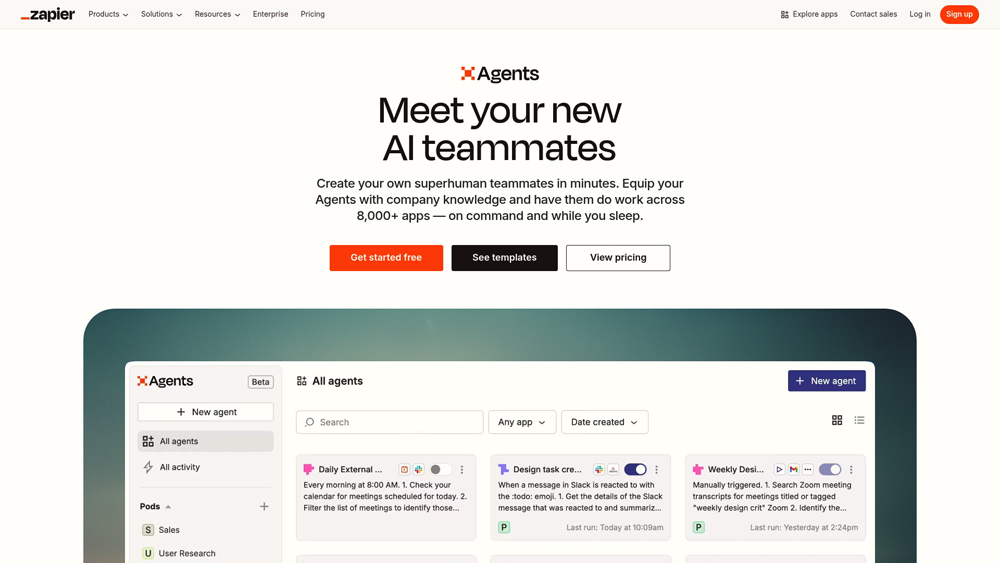
Zapier is the world’s leading automation platform that connects over 7,000+ apps to create seamless, automated workflows called Zaps. In 2026, it has evolved beyond simple “if-this-then-that” logic into a full-scale AI automation hub. With Zapier Central, users can now build autonomous AI agents that interact with live data across their entire tech stack. Whether you are a small business owner or an enterprise developer, Zapier provides the glue that allows your AI tools and legacy software to work together as a single, unified system.
In-Depth Analysis: From Zaps to AI Agents
Zapier has transitioned from a utility tool to a foundational AI layer for modern business. We evaluate its 2026 performance based on the integration of Zapier Central (AI agents), the robustness of its 7,000+ app directory, and its ability to handle multi-step, logic-heavy workflows. For teams looking to eliminate manual data entry and build custom AI-powered internal tools without code, Zapier is the primary platform of choice.
Key Takeaways: Pros, Cons & Quick Summary
This summary highlights why Zapier is the go-to for automation, alongside the practical limitations to consider before scaling.
Key Advantages (Pros)
- Massive Integration Library: Direct support for over 7,000+ applications, ensuring your entire stack is connected.
- Zapier Central (AI Agents): Build autonomous agents that research, summarize, and act across apps using live data.
- No-Code UI Builder: Zapier Interfaces allows you to build custom front-ends and client portals powered by your automations.
- Pathing & Logic: Advanced multi-step logic and conditional filtering for sophisticated enterprise workflows.
- AI-Powered Zap Building: Natural language “Copilot” that writes the logic for you based on simple text descriptions.
Potential Drawbacks (Cons)
- Complex Pricing Structure: Cost is based on task volume; high-frequency automations can become very expensive.
- Occasional Sync Latency: While “Instant” triggers exist, some polling-based apps still have a 1-to-15 minute delay.
- Steep Learning Curve for Logic: Setting up complex nested loops and data formatting still requires an “automation mindset.”
Core Features: Zapier Central, Tables & Canvas
Zapier has evolved into a comprehensive automation suite. By unifying data storage (Tables), workflow mapping (Canvas), and AI logic (Central), it provides an end-to-end solution for business process management.
-
Zapier Central: An AI workspace where you can teach bots how to act on your behalf. These agents have ‘memory’ and can follow complex instructions across thousands of apps without a rigid workflow structure.
-
Zapier Tables: A purpose-built automation database. It allows you to store, edit, and move data through workflows more reliably than using external spreadsheets as a middle-man.
-
Zapier Canvas: A visual planning tool that helps teams diagram their entire business process and turn those diagrams into working automations with a single click.
-
AI-Powered Formatting: Zapier’s internal AI tools can now automatically clean, reformat, and translate data as it moves between apps, eliminating the need for complex regex or coding.
-
Enterprise Governance: Enhanced admin controls for 2026 allow large teams to manage app permissions, monitor task usage at a granular level, and ensure SOC2 compliance across all automated threads.
Agentic Automation & Data Connectivity
The 2026 landscape is defined by “Agentic” workflows. Zapier’s innovation lies in its ability to let AI agents not just “think,” but actually “do” work across your entire software ecosystem.
- Native AI Actions: Zapier provides a dedicated set of AI actions that allow models like GPT-4o and Claude 3.5 to trigger Zaps directly, making them the “arms and legs” of LLMs.
- Live Data Access: Through Zapier Central, AI agents can query your CRM, email, and project management tools in real-time to provide context-aware responses and actions.
- Multi-Step Pathing: Workflows can now branch into hundreds of possible directions based on AI-evaluated sentiment or data values, allowing for truly dynamic automation.
Speed, Scalability & Reliability
Reliability is the most critical metric for automation. Zapier 2026 features improved error-handling and auto-replay capabilities that ensure business-critical processes never fail silently.
- Auto-Replay & Error Discovery: If a third-party app goes down, Zapier automatically queues the data and retries the task once the service is restored, providing high availability for enterprise users.
- Task History & Logs: Deep, granular logging allows developers to troubleshoot specific data points within a complex multi-step Zap, making it easy to see exactly where a logic error occurred.
- Latency Performance: Most Zaps trigger within milliseconds for “Webhooks” and “Instant” integrations, providing the real-time responsiveness required for customer-facing chatbots and notifications.
Zapier Pricing & Production Value
Zapier’s 2026 pricing model has evolved into a Unified Task Bundle. This means your monthly task allowance is shared across Zaps (workflows), Central (AI Agents), and Interfaces (custom apps). While the Free tier is great for testing, the Professional plan remains the “entry point” for real business use as it unlocks conditional logic (Paths) and Auto-Replay.
FREEFor Individuals$0
- Tasks: 100 / mo
- Zaps: Unlimited (2-Step)
- AI: Zapier Copilot Basic
- Update: 15 Minute Sync
TEAMFor Collaborators$69
- Users: Unlimited Seats
- Shared: Folders & Connections
- Support: Premier Live Chat
- Update: 1 Minute Sync
ENTERPRISEGlobal OrchestrationCustom
- Admin: SCIM & Audit Logs
- Security: SAML SSO
- Management: Dedicated CSM
- Tasks: Annual Volume Deals
PRO TIP: In 2026, logic steps like Filters and Paths no longer consume tasks, allowing for complex decision trees on a budget; visitors should always check the official Zapier site for the most current task rates and plan features. Pay attention to “Pay-per-task” overages on the Professional plan; if you consistently go over, the Team plan is often cheaper due to the higher base allowance.
The Zapier Central Revolution
The standout innovation for Zapier in 2026 is Zapier Central. It allows you to create AI Agents that act as permanent “teammates.” Unlike a standard Zap that follows a strict if-this-then-that script, a Central Agent uses Natural Language Processing to understand context. You can teach it your brand voice, give it access to your CRM, and let it handle customer inquiries or lead qualification autonomously. Combined with the Zapier Canvas—a visual map of your entire automation ecosystem—it is the most user-friendly way to deploy “Agentic Workflows” without writing a single line of code.
Platforms Supported
- Cloud / Web
- Zapier Central (AI)
- Chrome Extension
- iOS Mobile (Monitor)
- Android (Monitor)
Training
- Zapier University
- Extensive Docs
- Certified Experts
Support
- 24/7 Support
- Community Forum
Prompt Colleague Score
Quick Facts
- Company: Zapier Inc.
- Latest Feature: Zapier Central (AI Agents)
- Best For: Multi-App AI Orchestration
- Integrations: 8,000+ Apps
- Pricing Model: Task-Based Bundle
- Free Tier: Yes (100 Tasks/mo)
- Official Site: zapier.com
Pricing & Access (2026)
- Free: $0 (100 Tasks)
- Professional: From $19.99/mo
- Team: $69/mo (Collaboration)
- Enterprise: Custom (Large Scale)
- Best Value: Professional (Logic & Paths)
Zapier Frequently Asked Questions (FAQ)
A Zap is an automated workflow that connects your apps. It consists of a Trigger (the event that starts the automation, like receiving a new lead in Facebook) and one or more Actions (the event Zapier performs automatically, like sending that lead to your CRM).
Yes, Zapier offers a Free tier that includes 100 tasks per month. However, it is limited to single-step Zaps. To use multi-step logic, conditional formatting, or “Premium” app integrations (like Salesforce or Shopify), a paid subscription is required.
While Zaps follow a rigid ‘if-this-then-that’ logic, Zapier Central allows you to build AI Agents. These agents use LLMs (like GPT-4) to reason across your data, chat with you about your apps, and perform autonomous actions without needing a pre-defined path for every scenario.
Yes. Using the ‘Paths’ feature (available on Professional plans and higher), you can create branching logic. For example, if a lead is from the USA, send it to the US Sales team; if it’s from Europe, send it to the EU team and translate the notification.
Zapier takes security seriously with SOC2 Type II and SOC3 compliance. Data is encrypted at rest and in transit. For Enterprise users, Zapier offers advanced admin controls to restrict which apps can be connected and ensures data is not used for training public AI models.
Yes, with ‘Zapier Interfaces,’ you can build custom web pages, forms, and kanban boards that sit on top of your automations. This allows you to create client-facing portals or internal tools that trigger Zaps directly from a branded UI.
Automation & Agentic APIs
Zapier’s professional power lies in its ability to bridge the gap between static software and dynamic AI. The Zapier API and Webhooks allow developers to trigger complex, multi-step workflows from custom-coded applications. In 2026, this has expanded into ‘Agentic’ endpoints, where external AI models can call upon Zapier’s 7,000+ app actions as a library of capabilities, effectively giving any AI the power to ‘work’ inside business software.
Enterprises use Zapier’s infrastructure to orchestrate data across siloed departments without building expensive custom integrations. By leveraging Zapier Tables as a high-speed automation database, teams can maintain a single source of truth that updates in real-time across CRM, ERP, and marketing platforms, all while maintaining strict governance and audit logs.
Automation Capabilities:
- Multi-Step Zaps
- Webhooks (Inbound/Outbound)
- Conditional Logic (Paths)
- Schedule Triggers
- Data Formatting (Formatter)
- Looping Actions
- Delay / Pause Steps
- Filter Logic
- Custom Python/JS Code Steps
- Digest/Summarization Tools
- Zapier Tables (Data Store)
- Canvas (Workflow Mapping)
AI & Agentic Features:
- Zapier Central (AI Agents)
- Natural Language Zap Building
- AI-Powered Data Cleaning
- Sentiment Analysis Triggers
- Agent ‘Memory’ Management
- Live External Data Retrieval
- Autonomous Task Execution
- Lead Scoring via AI
- Auto-Transcription Workflows
- AI Translation on-the-fly
- Image Generation Triggers
- Predictive Analytics Zaps
Data Management & Governance:
- SOC2 / SOC3 Compliance
- Admin App Restrictions
- Audit Logs
- Team Shared Workspaces
- Single Sign-On (SSO)
- Zap Version History
- Error Auto-Replay
- Granular Task Monitoring
- Zapier Tables Records
- Workflow Diagramming
- Data Retention Policies
- Custom API Endpoints
- Multi-Org Management
Product Features In Detail:
Beyond its reputation as a simple connector, Zapier functions as a sophisticated engine for business intelligence and autonomous operations. This section explores the advanced tools available within the Zapier ecosystem, from AI-driven agents that manage your inbox to visual builders that turn workflows into full-scale internal applications. Understanding these specific features is key to moving from basic automation to a fully integrated, AI-driven business infrastructure.
Zapier allows for virtually unlimited complexity. A single trigger can kick off a chain of dozens of actions, including data formatting, lookups in Zapier Tables, and logic branches that send different data to different team members based on the content.
This is the ‘brain’ of the operation. You can create AI agents that have long-term memory and access to your live data. Instead of setting up a static Zap, you can tell the agent: “Summarize my meetings and if a task is urgent, add it to Jira and notify me on Slack.”
With Paths, you can build conditional logic directly into your workflows. This means your automation can ‘decide’ which action to take based on the incoming data, effectively replacing hundreds of hours of manual triage work.
Zapier isn’t just invisible backend code. Interfaces allows you to build the front-end-forms, lead captures, and dashboards that your team or clients interact with. These interfaces are natively connected to your Zaps for instant data processing.
For technical users, the Formatter tool can handle everything from currency conversion to complex text extraction using AI. Webhooks allow Zapier to communicate with any app that has an API, even if it’s not officially in the Zapier directory.
Stop using slow spreadsheets to power your Zaps. Zapier Tables is a high-performance database designed specifically for automation, allowing you to store, move, and track millions of records with near-zero latency.
Control is crucial at scale. Zapier Enterprise provides a central command center where admins can manage security settings, oversee task usage across the entire company, and ensure that sensitive data stays within approved apps.
Building Zaps is now as easy as talking. You can describe the workflow you want in plain English, and Zapier’s AI Copilot will draft the steps, select the apps, and map the fields for you, reducing setup time from hours to seconds.
The Top 4 AI Tools: Our Editors' Picks for Instant Productivity!

ChatGPT
AI Assistants

Google Gemini
AI Assistants

Midjourney
Image Generators

Otter.ai
Meeting Assistants