

Adalo Review 2026: The Premier No-Code Builder for Native Mobile Apps
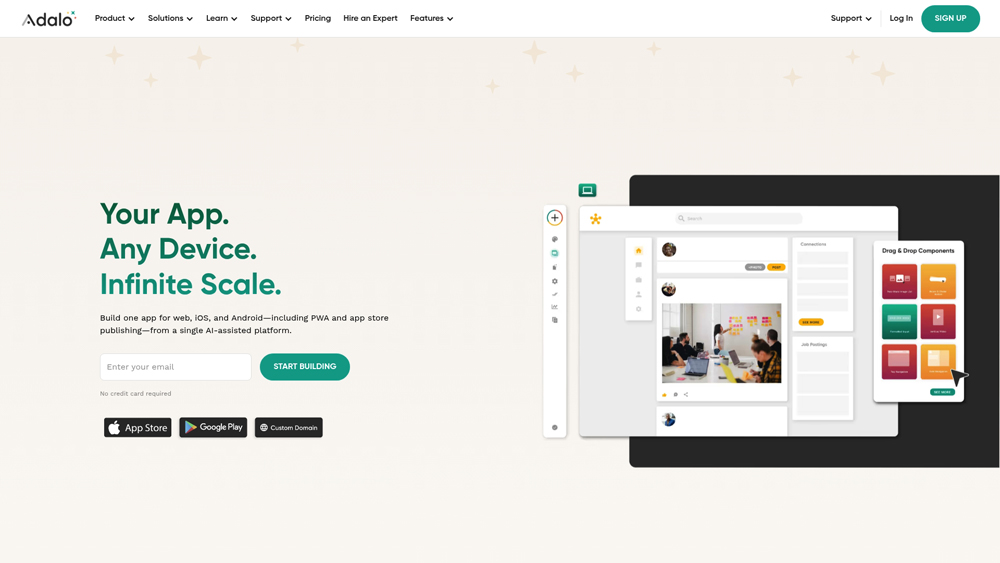
Adalo is the leading no-code platform that empowers you to build, test, and publish true native mobile applications directly to the Apple App Store and Google Play without writing a single line of code. Unlike web-based builders that only offer Progressive Web Apps (PWAs), Adalo provides a genuine “design-once, publish-everywhere” experience. You control the interface through an intuitive drag-and-drop canvas while managing data with built-in relational databases or external APIs.
In-Depth Review & Model Analysis
Adalo has democratized app development by removing the technical ceiling that typically blocks non-technical founders. We evaluate its primary strengths across visual design, database flexibility, and native publishing capabilities, focusing on the new Adalo 2.0 Responsive Engine and “Magic” AI features which are accelerating MVP timelines globally. This analysis assesses its readiness for production-grade mobile startups.
Key Takeaways: Pros, Cons & Quick Summary
This quick summary provides the core advantages and potential drawbacks of using Adalo for professional app development.
Key Advantages (Pros)
- Native Store Publishing: Directly publish binary files to the Apple App Store and Google Play Store without touching Xcode or Android Studio.
- Adalo Magic (AI): Instantly generate database schemas and sample data by simply describing your app idea in plain text.
- Visual Database Logic: Managing relationships (One-to-Many, Many-to-Many) is visually intuitive and requires no SQL knowledge.
- Component Marketplace: Access a library of third-party components (calendars, maps, payment stripes) to extend functionality.
- External Collections: Connect seamlessly to Xano, Airtable, or any REST API to handle heavy backend logic outside the app.
Potential Drawbacks (Cons)
- Performance at Scale: Apps with thousands of concurrent records can experience latency if not optimized with external backends.
- Limited Custom Logic: Complex “if/then/else” looping logic often requires connecting to external tools like Make or Zapier.
- Pricing Per App: Costs scale based on the number of published apps and record counts, which can get expensive for agencies.
Core Features: Native Publishing & "Magic" AI Generation
Adalo provides a specialized suite of tools designed to move you from a napkin sketch to the App Store in record time. We focus on the features that actually ship products, such as one-click native publishing, visual database modeling, and the AI-driven “Magic” engine that automates the tedious parts of setup.
-
Component Marketplace & Integrations: You can extend your app’s functionality far beyond basic buttons. The marketplace allows you to drop in complex components like Stripe payment portals, Google Maps, and calendar interfaces, or connect to thousands of APIs via Zapier and Make.
-
Visual Actions & Logic: You build interactivity through a simple “When user clicks X, do Y” logic builder. This handles everything from creating data records and updating user profiles to triggering push notifications and linking deep into other screens.
-
True Native Publishing: Unlike competitors that wrap web pages, Adalo compiles your project into real binary files (.ipa and .apk). You upload these directly to Apple App Store Connect and the Google Play Console, giving you a genuine presence on users’ home screens.
-
Adalo “Magic” AI: The platform uses generative AI to eliminate “blank canvas syndrome.” You simply type a description of your app idea, and the Magic engine instantly generates the necessary database collections, relationships, and initial screen layouts.
-
Responsive Engine (2.0): The builder allows you to design once and scale everywhere. The layout engine automatically adjusts component positioning for mobile, tablet, and desktop viewports, ensuring your app looks professional on any device.
Platform Architecture & Database Logic
Understanding Adalo’s visual relational database is critical to building scalable applications. The architecture prioritizes speed of development over granular code control, using a unique “External Collections” system to handle heavy data lifting.
-
Internal Relational Database: At its core, Adalo offers a built-in database that handles relationships (one-to-many, many-to-many) intuitively. You visually link “Users” to “Trips” or “Orders” to “Items” without writing a single SQL query, making complex data architecture accessible to non-technical founders.
-
Adalo Magic Engine: This architecture integrates Large Language Models (LLMs) directly into the builder. It doesn’t just write text; it understands app structure. It translates your natural language prompts into actual database schemas and frontend components, drastically reducing setup time.
-
External Collections (API Layer): For high-scale applications, Adalo separates the frontend from the backend. You can connect the Adalo UI to powerful external backends like Xano, Supabase, or Airtable. This hybrid architecture allows you to scale your user base without hitting the performance ceilings of the internal database.
Builder Speed, App Performance & Designer UX
Performance testing evaluates both the speed of the editor (how fast you can build) and the runtime performance of the final application (how fast it feels to users). Adalo scores exceptionally high on build speed but requires optimization for large datasets.
-
Runtime Application Speed: Native apps built on Adalo are generally smooth for standard use cases. However, performance relies heavily on how you structure your data. Apps loading thousands of records simultaneously can experience latency, requiring you to implement pagination or external backend filtering to maintain a snappy user experience.
-
Designer Experience (UX): The “slide-deck” interface is Adalo’s strongest asset. If you can use PowerPoint or Keynote, you can use Adalo. The drag-and-drop canvas is free-form, meaning you place elements exactly where you want them, freeing you from the rigid grid structures found in other no-code tools.
-
Visual Debugging: The system proactively prevents logic errors. If you delete a database field that a button relies on, Adalo flags the specific action in red (“Missing Data”). This visual error handling ensures you rarely publish a broken build, catching issues before your users do.
Adalo: 2026 Mobile-First Pricing
The latest Component Marketplace and Custom Action capabilities provide “pro-level” flexibility for complex logic and integrations. With a vast library of pre-built UI kits, seamless API connectivity, and the new responsive web-app publishing, it remains the most flexible tool for both rapid prototyping and full-scale app deployment.
STARTERMost Popular$45
- Price: $45/mo
- Model: 1 Native App
- Core: Standard Web Publishing Plus 10k Monthly App Actions and Basic Logic Support
- Best For: Solo Entrepreneurs and Creative Founders Building Simple MVP Prototypes
TEAM PLANMost Popular$200
- Price: $200/mo
- Model: 5 Native Apps
- Core: Priority Response Support Plus Five Design Seats and External Database Syncing
- Best For: Boutique App Agencies and Design Teams Managing Multiple Client Environments
BUSINESSMost Popular$250
- Price: $250/mo
- Model: 10 Native Apps
- Core: Unlimited Design Seats Plus Advanced Version Control and Maximum Action Quotas
- Best For: Large Enterprise Portfolios and High-Volume Mobile Solutions for Corporations
Note: Adalo publishing to the Apple and Google App Stores requires a Professional plan or higher; Starter plans are limited to web-domain publishing. Monthly App Action limits (e.g., 30,000 for Professional) reflect your app’s concurrent processing power, though Adalo 3.0 infrastructure now prevents app shutdowns if these limits are exceeded. Organizations with complex data needs may require a separate Xano or Supabase backend subscription. Always verify the latest record-count thresholds in your Adalo Builder settings, as localized pricing and seasonal “Maker” discounts are subject to change.
Product Details
Adalo bridges the gap between high-end design and functional mobile software. It empowers founders to move from a Figma sketch to a live, native App Store listing without the overhead of a dev team. It is our go-to recommendation for creators who want total visual freedom and a ‘drag-and-drop’ path to launching their first MVP.
- Platforms Supported
- Cloud (SaaS)
- iPhone (Native iOS)
- Android (Native APK)
- Web App (PWA)
- Training
- Documentation
- Adalo App Academy
- Video Tutorials
- Support
- Online Ticketing
- Community Forum
- Expert Hiring Network

Prompt Colleague Score
Quick Facts
- Company: Adalo
- Best For: Founder MVPs & Native Mobile Apps
- Core AI Tool: Magic Start (Prompt-to-App Scaffolding)
- New in 2026: Adalo 3.0 (High-Performance Engine)
- Key Integration: Adalo Sheetbridge (Native Google Sheets Sync)
- Publishing: One-click to iOS, Android, and Web
- Official Site: adalo.com
Pricing & Access (2026)
- Free Tier: Unlimited Prototyping (500 Records)
- Starter: $45/mo (1 Published App + Custom Domain)
- Professional: $65/mo (2 Apps + Geolocation + Design Versions)
- Team: $200/mo (5 Apps + Xano + Priority Support)
- Best Value: Professional (Includes most AI components)
Frequently Asked Questions (FAQ)
Yes. Adalo’s primary differentiator is that it compiles your project into real binary files (.ipa for iOS and .apk/.aab for Android). On the Starter plan and above, you can upload these directly to your own developer accounts on the App Store and Google Play Store.
It depends on the data load. Adalo is excellent for internal tools, MVPs, and consumer apps with moderate data complexity. For heavy enterprise logic, we recommend using Adalo as the front-end (UI) while connecting to a robust backend like Xano or Supabase via External Collections.
No, you own the intellectual property (IP), design, and user data of your application. However, the app code itself runs on the Adalo platform, so you cannot “export” the source code (like React Native code) to host it elsewhere independently.
Adalo Magic uses generative AI to speed up the build process. “Magic Start” can generate your entire database schema and populate it with sample data based on a simple text prompt. It also assists in auto-generating formulas and text content within the app.
Adalo is primarily no-code, but you can extend it. You can build custom components if you know React Native, or use the API integration feature to connect to any external service that runs custom scripts.
The Free plan is designed for learning and prototyping. It does not allow you to publish to the Apple or Google stores and has a limited number of database records. To launch publicly, you will need at least the Starter plan.
Yes, Adalo’s builder allows you to design for mobile, tablet, and desktop views simultaneously. The new Responsive Engine ensures your components adjust automatically to the user’s screen size.
Adalo apps generally require an internet connection to fetch data. While some static content may load, full offline read/write synchronization is not a native feature and would require complex workarounds.
External Collections allow your Adalo app to talk to databases outside of Adalo (like Airtable, Google Sheets, or Xano). This lets you use Adalo solely for the UI while managing your data elsewhere.
Absolutely. You can integrate Stripe for payments, set up subscriptions, or sell digital goods using native in-app purchase components (requires configuration with Apple/Google).
Adalo provides standard encryption for data at rest and in transit. However, it is not HIPAA compliant out-of-the-box. For highly sensitive data, we recommend using a HIPAA-compliant external backend connected via API.
Very low. Adalo is considered one of the easiest no-code tools to learn because it functions like a slide-deck builder. Most users can build a functional prototype in a single weekend.
Core Features: Responsive Engine & Magic AI
Adalo combines a free-form design canvas with structured database power. The platform’s standout feature is the ability to maintain a single design project that automatically adapts to mobile, tablet, and desktop screens. You gain access to “Magic Start,” an AI agent that builds your database architecture in seconds.
The platform’s deep integration with native device features, like camera, location, and push notifications ensures your end product feels like a professionally coded application.
Artificial Intelligence:
- Magic Start (Database AI)
- OpenAI Integration
- Auto-Data Classification
- Image Generation (via API)
- X-Ray Performance AI
- Magic Text (Dynamic Data)
- Workflow Automation
- Predictive Lists (via API)
- Custom Actions
- API-Based Agents
- Text-to-App (Beta)
- Smart Filtering
Chatbot:
- Custom Chat Interface
- Real-Time Messaging
- Push Notifications
- User-to-User Chat
- Group Messaging Logic
- Image/File Uploads
- Message History/Logs
- Native Voice Mode
- Sentiment Analysis
- Autonomous Browsing
- In-App Reporting
- Admin Dashboards
Conversational AI:
- Conditional Actions
- Multi-Language Apps
- Interactive Forms
- User Roles & Permissions
- Data Linking
- Visual Action Builders
- Profile Personalization
- Deep Linking
- Stripe Payments
- Map Integration
- Native Speech Recognition
- Native Speech Synthesis
- Biometric Auth (FaceID)
Natural Language Generation:
- Dynamic Magic Text
- SEO Settings (PWA)
- Rich Text Formatting
- Database Content Injection
- Custom Formulas
- Context-Aware Filters
- Collection Lists
- Native Translation
Natural Language Processing:
- Search & Filtering
- Data Relationships
- Version History
- Team Collaboration
- Zapier Integration
- Component Marketplace
- Entity Extraction
- Topic Modeling
Product Features In Detail:
Beyond a simple drag-and-drop interface, Adalo functions as a comprehensive development ecosystem for building “true” native mobile and web applications. This section provides in-depth answers and specific use-case descriptions that demonstrate how entrepreneurs and businesses leverage Adalo for mission-critical tasks, including native iOS/Android publishing, relational database management, workflow automation, and external API integrations. These details are essential for understanding how to transform a concept into a scalable, production-ready app without writing a single line of code.
Adalo’s drag-and-drop interface allows for true “What You See Is What You Get” (WYSIWYG) design. Unlike rigid grid-based builders, you can place components anywhere, allowing for complete creative freedom when building your app’s user interface.
One of Adalo’s “killer features” is its ability to build native mobile apps. You can export your projects directly to the Apple App Store and Google Play Store, ensuring your users get a high-performance experience with access to device features like push notifications.
Users can create and manage relational databases without writing SQL. You can define collections, properties, and relationships (one-to-many, many-to-many) directly within the builder, making it easy to handle complex user data and content.
For advanced projects, Adalo can connect to external backends like Xano or Airtable. Its “Custom Actions” feature allows you to integrate with any REST API, enabling your app to send and receive data from thousands of third-party services.
The Adalo Marketplace offers a library of community-created components. This allows you to extend your app’s functionality with specialized tools like advanced charts, calendars, and audio players that go beyond the standard built-in kit.
Adalo simplifies monetization with built-in Stripe integrations. You can easily set up one-time payments or recurring subscriptions, and even implement native IAP (In-App Purchases) for digital goods directly through the mobile stores.
Security is handled out-of-the-box with pre-configured sign-up and login flows. Adalo manages user sessions and data permissions, ensuring that sensitive information is only accessible to authorized users based on the logic you define.
Beyond native mobile, Adalo supports the creation of Progressive Web Apps. This means your application can be accessed via a browser on any device, providing a seamless cross-platform experience with a single codebase.
The Top 4 AI Tools: Our Editors' Picks for Instant Productivity!

ChatGPT
AI Assistants

Google Gemini
AI Assistants

Midjourney
Image Generators

Otter.ai
Meeting Assistants