

GitHub Copilot Review 2026: The Premier AI Agent for Software Engineering
GitHub Copilot is a sophisticated AI-powered developer tool that functions as an autonomous pair programmer, embedded directly into the IDE. Developed by GitHub in collaboration with OpenAI and Microsoft, it leverages advanced large language models to provide real-time code completions, entire function generations, and automated unit testing. In 2026, it has evolved into a full-scale engineering agent capable of managing complex refactoring, documentation, and pull request descriptions across diverse tech stacks.
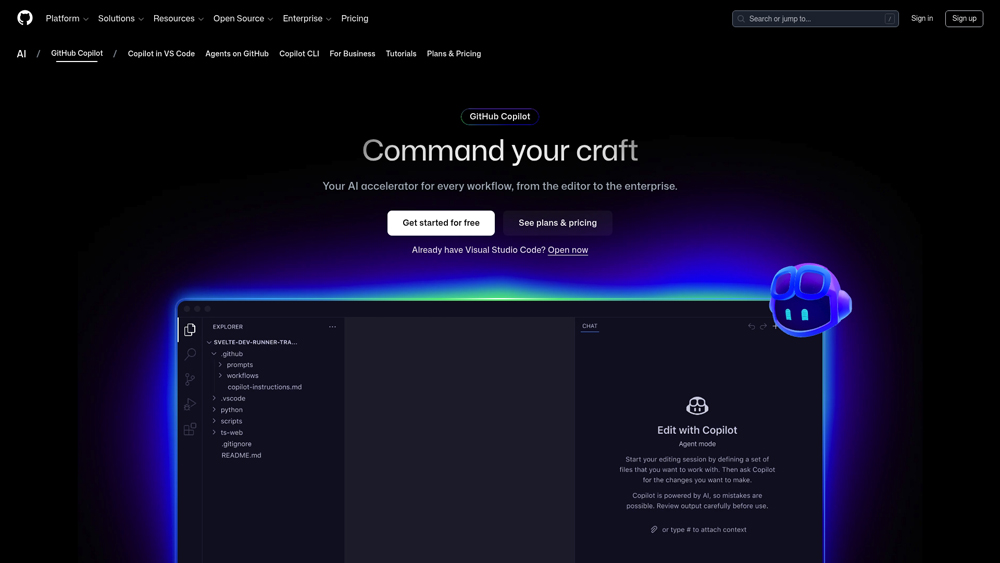
In-Depth Engineering & Agentic Analysis
GitHub Copilot has transitioned from a simple autocomplete tool to a proactive engineering agent. We evaluate its performance based on its context-awareness within large-scale repositories, its multi-model flexibility (allowing users to toggle between GPT-4o and Claude 3.5/5), and its ability to significantly reduce time-to-ship. This analysis highlights how Copilot manages the cognitive load of developers by automating the most repetitive and error-prone segments of the codebase.
Key Takeaways: Pros, Cons & Quick Summary
This overview summarizes the critical strengths and trade-offs of deploying GitHub Copilot in a professional engineering environment.
Key Advantages (Pros)
- Multi-Model Flexibility: Allows developers to choose between OpenAI, Anthropic, and Google models for specific tasks.
- Deep IDE Integration: Operates natively inside VS Code, JetBrains, and Visual Studio for a zero-friction workflow.
- Contextual Awareness: Superior understanding of the entire local repository and project-wide dependencies.
- Agentic Automation: Capable of writing tests, explaining legacy code, and suggesting refactoring strategies autonomously.
- Enterprise Ecosystem: Seamlessly bridges the gap between local coding and GitHub PR/Issue management.
Potential Drawbacks (Cons)
- Hallucination Risks: Occasionally suggests outdated libraries or logically sound but incorrect syntax.
- Subscription Dependent: No permanent free tier for professional use beyond limited trials.
- Privacy Configuration: Corporate users must ensure Enterprise settings are active to prevent code telemetry usage.
Core Features: From Autocomplete to Engineering Agent
GitHub Copilot provides a robust suite of tools that target every stage of the development process. In 2026, the tool has expanded into “Copilot Extensions” and “Copilot Workspace,” enabling a unified experience from the first line of code to the final deployment.
-
Copilot Chat & Workspace: A dedicated conversational interface that understands your entire codebase. You can ask for bug fixes or feature implementations, and Copilot will plan and execute the changes across multiple files.
-
Customizable Model Selection: Power users can now switch models within the chat interface, selecting Anthropic’s Claude 3.5 Sonnet for logical reasoning or GPT-4o for rapid boilerplate generation.
-
Automated Testing & Security: Copilot can autonomously generate unit tests and identify common security vulnerabilities (like SQL injection) before the code is even committed.
-
CLI & Terminal Integration: Extends AI assistance to the command line, helping developers write complex shell scripts and debug environment issues in real-time.
-
Copilot Extensions: Integration with third-party tools like Sentry, Docker, and Azure, allowing the AI agent to interact with your cloud infrastructure and monitoring tools.
Model Performance & Language Versatility
The effectiveness of Copilot is rooted in its massive training dataset and high-performance inference. It supports hundreds of programming languages and frameworks, ensuring consistent output regardless of the tech stack.
- Polyglot Mastery: While excelling in Python, JavaScript, and TypeScript, Copilot is remarkably capable in niche or systems languages like Rust, Go, and C++.
- Speed of Suggestion: Inference is optimized for minimal latency, providing “ghost text” suggestions that keep pace with a fast-typing developer.
- Advanced Context Windows: The agentic features utilize large context windows to “read” related files, documentation, and architecture diagrams, ensuring suggestions are project-relevant rather than generic snippets.
Developer Experience (DX) & Workflow Impact
We measure Copilot’s impact through “Developer Flow”, the ability to stay in the zone without switching to documentation or Stack Overflow.
- Natural Language to Code: The ability to describe a complex algorithm in English and receive a 90% accurate implementation is the primary driver of its high productivity score.
- Refactoring & Legacy Support: Copilot excels at explaining “spaghetti code” and suggesting modern, more efficient patterns for legacy systems.
- Reduced Mental Fatigue: By automating boilerplate tasks like API calls and data mapping, Copilot allows engineers to focus on higher-level architectural decisions.
GitHub Copilot Pricing & Value (2026)
GitHub Copilot remains the most integrated tool for developers. With options for individual freelancers, high-growth teams, and large enterprises, it provides a tailored experience that scales with your code volume and security needs.
INDIVIDUALFor Freelancers$10
- Price: $10/mo
- IDE Support: Full Extensions
- Chat: Native In-IDE
- Best For: Solo Devs
ENTERPRISECustom Needs$39
- Price: $39/user
- Knowledge: Indexing / Fine-tuning
- Compliance: SOC2 & ISO
- Best For: Large Organizations
FREE (Limited)For Students$0
- Price: $0
- Verification: Required
- Features: Basic Completion
- Best For: Verified Learners
Note: GitHub Copilot pricing is fixed but offers substantial discounts via GitHub Global Campus for students. Professional features like “Custom Model Fine-tuning” and “Copilot for Business” require admin-level setup. Enterprise data is protected and never used to train global models. Verify the latest subscription details at github.com/pricing.
Product Details
GitHub Copilot is the premier choice for professional software engineering. It offers the most stable and feature-rich environment for AI-assisted coding, making it our top recommendation for engineering teams looking to modernize their development stack.
Platforms Supported
- VS Code
- JetBrains
- Visual Studio
- Vim / Neovim
- Xcode (via Plugins)
- GitHub Mobile
Training
- GitHub Docs
- Community Forum
Support
- 24/7 Ticketing
- Enterprise Manager

Prompt Colleague Score
Quick Facts
- Company: GitHub (Microsoft)
- Launched: 2021
- Headquarters: San Francisco, USA
- Best For: Agentic Software Engineering
- Key Tech: Copilot Workspace / Agent Skills
- Models: GPT-5.2, Claude 3.7, Gemini 3
- Official Site: github.com
Pricing & Access
- Free Tier: 2,000 Completions / Month
- Pro: $10/mo (Unlimited Completions)
- Pro+: $39/mo (All SOTA Models)
- Business/Ent: $19 – $39 / user / mo
GitHub Copilot: Frequently Asked Questions (FAQ)
In 2026, GitHub Copilot allows developers to swap the underlying LLM. You can choose Anthropic’s Claude 3.5/5 for complex logical reasoning, GPT-4o for rapid boilerplate, or Google Gemini 1.5 Pro for massive context windows, all within the same IDE extension.
For Business and Enterprise users, GitHub guarantees that your code snippets and telemetry are never used to train the public models. Data is encrypted in transit and at rest, maintaining strict intellectual property boundaries for corporate environments.
While Cursor is a standalone AI-first IDE fork, GitHub Copilot is a powerful extension that integrates into your existing workflow (VS Code, JetBrains, Visual Studio). Copilot excels through its deep integration with the GitHub ecosystem and enterprise-grade security features.
Yes, through the Copilot Workspace agent. You can assign an issue to the agent, which will then plan the changes across multiple files, write the code, and generate a pull request for your review without manual file-hopping.
GitHub Copilot is highly effective at analyzing legacy systems. It can explain undocumented functions, suggest modern syntax updates (e.g., migrating from Python 2 to 3), and generate comprehensive unit tests to ensure stability during the refactor.
GitHub offers a free version for verified students, teachers, and maintainers of popular open-source projects. For all other individual developers, a paid subscription is required to access the full agentic and multi-model features.
Engineering Agent APIs & Extensions
The architectural shift in GitHub Copilot for 2026 focuses on ‘Copilot Extensions’ and programmatic access for CI/CD pipelines. By leveraging the Copilot API, engineering teams can build custom agents that understand proprietary internal frameworks and libraries. This allows for automated code reviews that enforce company-specific style guides and security protocols, ensuring that AI-generated code meets the highest production standards before ever reaching a human reviewer.
Integration with third-party tools like Sentry, Docker, and Kubernetes enables Copilot to function as a full-stack DevOps agent. Developers can use these endpoints to automate infrastructure management, monitor real-time error logs, and trigger autonomous ‘healing’ scripts. This API-driven approach transforms Copilot from a simple autocomplete plugin into the central nervous system of the modern software development lifecycle.
Core Engineering Capabilities:
- AI Pair Programmer
- Unit Test Generation
- SQL Query Optimization
- Regex Completion
- Multi-Language Support
- Repository Indexing
- Infrastructure as Code
- Agentic Bug Fixing
- Vulnerability Scanning
- Context-Aware Logic
- Pull Request Summaries
- CLI Integration
Development Workflow Automation:
- Machine Learning Inference
- Deep Symbol Analysis
- Legacy Code Interpretation
- Large 128k Context Window
- Library Documentation Lookup
- Boilerplate Automation
- Deployment Scripting
- Real-time CLI Suggestions
- CI/CD Integration
- Code Explainer Agent
- Commit Message Generation
- Refactor Suggestions
Autonomous Engineering Agents:
- Intent Recognition
- Polyglot Reasoning
- Integrated Chat
- OSS Policy Controls
- Architecture Analysis
- Agentic Feature Planning
- Remote Repository Personalization
- Secure Token Management
- Issue-to-PR Workflows
- Logic Error Detection
- Docker Support
- Kubernetes Management
- Security Policy Enforcement
Source Code Generation:
- Full Function Synthesis
- API Endpoint Generation
- Documentation-to-Code
- Cross-File Pattern Matching
- Dependency Management
- Type-Safe Logic
- Schema Generation
- Front-end Component Building
Repository Analysis & Reasoning:
- AST Parsing
- Symbol Definition Lookup
- Dead Code Detection
- Cross-Module Logic Flow
- Project-Wide Semantic Search
- Architectural Debt Analysis
- Tech Stack Migration
- Complex Debugging Agents
- Unit Test Coverage Analysis
- Environment Debugging
Product Features In Detail:
As a premier engineering agent, GitHub Copilot provides specialized toolsets designed specifically for the professional software developer’s ecosystem. This detailed breakdown explores how Copilot handles the complexity of modern codebases, from multi-model reasoning and autonomous workspace management to advanced security and terminal assistance. For engineering leaders and individual contributors alike, understanding these detailed features is key to maximizing productivity and maintaining high code quality across the entire development team.
GitHub Copilot is model-agnostic in 2026. Developers can switch the inference engine on-the-fly, utilizing OpenAI’s GPT-5 for creative logic, Anthropic’s Claude 3.5 Sonnet for precise code refactoring, or Google Gemini for analyzing massive repositories with its million-token context.
The Workspace agent allows developers to stay in a ‘flow’ state by handling the mechanics of feature implementation. Describe a new feature in natural language, and the agent plans, executes, and tests the code across your entire directory structure autonomously.
Copilot filters out common insecure code patterns in real-time. For Enterprise users, it includes custom policy enforcement, ensuring that AI-generated code complies with corporate safety standards and never inadvertently leaks sensitive secrets or tokens.
Beyond the code editor, Copilot lives in the CLI. It helps engineers write complex shell scripts, explain terminal errors, and manage containerized environments via natural language, bridging the gap between local development and operations.
Copilot Chat understands your @workspace. It doesn’t just look at the open file; it indexes your entire local and remote repository, allowing you to ask questions about global symbols, cross-module dependencies, and project architecture.
GitHub has opened the platform to third-party extensions. You can now use Copilot to query your Sentry logs, interact with Docker containers, or manage Azure/AWS resources, making the AI an active participant in your infrastructure management.
One of the most valuable time-savers is Copilot’s ability to generate high-coverage unit tests and JSDoc/Docstring style documentation instantly. It ensures that your code is not just functional, but maintainable and professional.
Copilot includes a built-in security agent that scans for vulnerabilities like SQL injection or hardcoded credentials as you type. It proactively suggests safer alternatives, significantly reducing the security debt of new codebases.
The Top 4 AI Tools: Our Editors' Picks for Instant Productivity!

ChatGPT
AI Assistants

Google Gemini
AI Assistants

Midjourney
Image Generators

Otter.ai
Meeting Assistants