

Murf AI Review 2026: The Premier Studio for Professional Voiceovers
Murf AI is a high-end AI voice generator designed for creators, educators, and businesses who need studio-quality narration without hiring voice actors. Unlike simple text-to-speech tools, Murf provides a full “Voice Studio” where users can time audio to video, adjust emphasis, and mix background music. It is widely used for E-learning, YouTube content, corporate presentations, and advertising, offering over 120+ lifelike voices across 20+ languages.
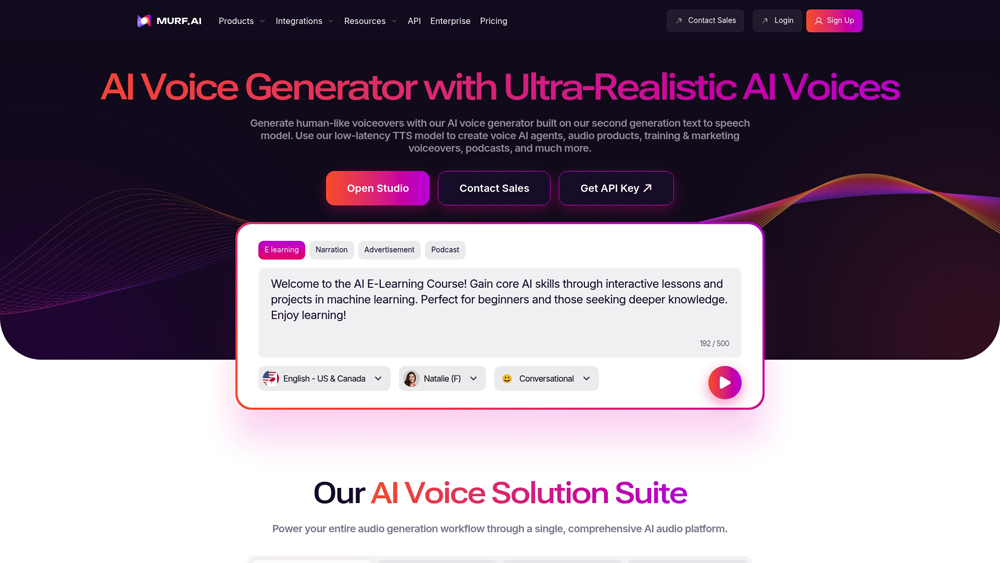
In-Depth Review & Voice Studio Analysis
Murf AI has carved out a niche as the “Canva of Voiceovers.” While competitors focus purely on the model, Murf focuses on the workflow. We evaluate its performance based on vocal naturalness, the flexibility of the Murf Studio editor, and its collaborative features for enterprise teams. In 2026, Murf’s ability to handle complex pronunciation and varied emotional tones puts it at the forefront of corporate and educational media production.
Key Takeaways: Pros, Cons & Quick Summary
This quick summary highlights why Murf AI is a favorite for video editors and why some power users might find its pricing structure restrictive.
Key Advantages (Pros)
- Integrated Video Editor: Effortlessly sync your AI voiceover with video clips directly inside the browser.
- High-Quality Stock Music: Includes a massive library of royalty-free background music to mix with your voices.
- Granular Control: Change pitch, emphasis, and speed for every individual word or sentence.
- Voice Cloning: Create a custom AI clone of your own voice for consistent brand narration.
- Google Slides Add-on: Ideal for educators wanting to turn presentations into narrated videos instantly.
Potential Drawbacks (Cons)
- No Downloads on Free Tier: You can only share links to your projects; downloading files requires a paid plan.
- Character Caps: Pricing is based on “Voice Generation Hours,” which can be used up quickly during editing.
- Language Depth: While it supports 20+ languages, the variety of voices for non-English languages is smaller.
Core Features: Murf Studio & Multi-Modal Audio Mixing
Murf AI differentiates itself by being a production-first platform. It’s not just about the “speech,” it’s about the final “media file.” The features are built to save hours in post-production for content creators and training departments.
-
Murf Studio Editor: A timeline-based editor that lets you see your script side-by-side with your video blocks, allowing for frame-accurate audio alignment.
-
Emphasis and Variation: One of Murf’s strongest features is the ability to select specific words and apply “emphasis” nodes, allowing the AI to sound more natural when highlighting key terms.
-
Voice-over-Video: Upload your video or images directly. Murf allows you to adjust the volume of the AI voice against background tracks and original video audio for a professional mix.
-
Grammar & Pronunciation Assistant: Built-in checks ensure your script is polished, with a pronunciation tool to teach the AI how to say unique brand names or technical jargon.
-
Enterprise Collaboration: Workspace features allow multiple team members to edit the same project, manage permissions, and share a centralized library of branded voices.
Voice Quality & Emotional Intelligence
The quality of Murf’s neural voices is tailored for clarity and “authority,” making them ideal for training and corporate use rather than just casual chat. Their 2026 models feature significantly improved emotional range.
- Professional Narration: Murf’s voices are curated from professional voice actors, ensuring that the cadence and breathiness of the AI models feel sophisticated and polished.
- Emotional Presets: Switch between “Inspirational,” “Conversational,” “Promo,” or “News” tones with a single click to instantly change the vibe of your narration.
- Voice Changer: You can upload a home-recorded voice clip and use Murf to transform it into a professional studio voice while keeping your original timing and inflections.
Performance, Speed & User Experience (UX)
Murf focuses on making the complex task of audio engineering accessible to non-technical users. The platform’s UI is clean, modern, and highly responsive.
- Rendering Speed: Even for long-form scripts (10+ minutes), Murf generates the audio preview in segments, meaning you can listen to your work almost immediately without waiting for a full file export.
- Ease of Use: The drag-and-drop interface for background music and the simple block-based script editor make it easy for beginners to produce high-quality audio within minutes.
- Reliability: Being a cloud-based studio, it saves progress automatically, and the 2026 infrastructure ensures high uptime even when processing high-bitrate WAV exports for enterprise clients.
Murf AI Pricing & Production Value
Murf AI offers a structured tier system designed for scalability. In 2026, the introduction of the Falcon Engine has made the Business plan the high-value target for teams, offering the best balance of generation hours and advanced features like “Say It My Way.”
FREEExplore Studio$0
- Gen Time: 10 Minutes
- Voices: 200+ (Trial)
- Downloads: None Included
- Commercial: Not Included
CREATORSolo Professionals$29
- Gen Time: 24 Hours / Year
- Downloads: Unlimited
- Commercial: Full Rights
- Feature: Canva Integration
ENTERPRISEGlobal ScalingCustom
- Gen Time: Unlimited
- Cloning: Custom (Add-on)
- Security: SSO & MSA
- Support: Dedicated Manager
PRO TIP: Murf uses an annual allocation for generation hours on paid plans. If you subscribe to the Business plan, you get your full 96 hours upfront. Voice Cloning is an exclusive Enterprise add-on and is not included in standard retail tiers.
The 2026 'Studio' Advantage
Murf AI’s 2026 Falcon Engine boasts a 99.38% pronunciation accuracy, making it the top choice for technical e-learning. Unlike other tools, Murf’s Variability feature lets you generate multiple versions of a single line with one click, allowing you to choose the perfect “take” without re-writing your prompt.
Platforms Supported
- Cloud (Web-Based)
- Google Slides Add-on
- Canva Integration
- API Access
Training
- Video Tutorials
- Help Center
- Webinars
Support
- Priority Email
- Live Chat (Pro)
- Dedicated Manager (Ent)

Prompt Colleague Score
Quick Facts
- Company: Murf Inc.
- Latest Model: Speech Gen 2 (Falcon)
- Best For: E-Learning & Corporate Video
- Unique Feature: Say It My Way (Intonation Sync)
- Integrations: Canva, PPT, Google Slides
- Free Tier: Yes (10 Mins Generation)
- Official Site: murf.ai
Pricing & Access (2026)
- Free Tier: $0 (No Downloads)
- Creator: $29/mo (24 hrs/year)
- Business: $99/mo (96 hrs/year)
- Enterprise: From $75/user (Unlimited)
- Best Value: Business (for Collaboration)
Frequently Asked Questions (FAQ)
Gen2 is Murf’s flagship model for studio-quality narration, offering deep emotional nuance and precision editing. Falcon is the 2026 ultra-fast streaming model, delivering sub-130ms latency, making it ideal for real-time conversational agents and live applications.
Yes, Murf offers a free tier that allows you to test all 200+ voices. However, the free plan is limited to 10 minutes of voice generation total, does not allow downloads, and does not grant commercial usage rights.
Absolutely. Murf’s AI Dubbing tool allows you to upload a video, automatically transcribe it, and overlay a translated AI voiceover. It supports over 28 languages with high-fidelity lip-syncing capabilities in the Pro and Enterprise tiers.
Commercial rights are included in all paid plans (Creator, Business, and Enterprise). This allows you to use Murf-generated audio for YouTube monetization, advertising, corporate training, and broadcast media legally.
Voice Cloning is an Enterprise-grade feature where Murf creates a digital twin of a specific human voice. It requires roughly 30 minutes of high-quality audio data and offers life-like emotion control for consistent brand messaging.
Yes, Murf offers native integrations and add-ons for Canva, Google Slides, and Adobe Captivate. For professional workflows, you can also export timed scripts and high-bitrate WAV files for use in Premiere Pro or DaVinci Resolve.
Voice Synthesis & Streaming APIs
The Murf API suite provides developers with high-performance access to the Gen2 and Falcon voice engines. Supporting REST, gRPC, and WebSockets, the API is built for scale, capable of handling 10,000+ concurrent calls without latency degradation. With data residency options in over 11 regions, it is the premier choice for global enterprises requiring secure, on-shore audio processing and real-time TTS streaming for AI agents.
Enterprise developers leverage Murf’s Bulk Dubbing and Voice Changer APIs to automate localization at scale. The platform’s zero-data retention (Base64 encoding) ensures that sensitive corporate scripts are never stored or used for model training. This infrastructure supports seamless integration into CRM systems, IVR telephony, and e-learning platforms, providing a consistent vocal identity across all digital touchpoints.
Murf AI Core Features:
- Text-to-Speech
- AI Dubbing
- Voice Cloning
- Audio-Video Sync
- Multi-Language (40+)
- Neural Voice Styling
- API Integration
- Custom Pronunciation
- Team Collaboration
- Voice Changer
- SSML Support
- Canva/PPT Add-ons
Professional Voiceover Specs:
- Pitch Control
- Emphasis Tool
- Pause Insertion
- Speed Modulation
- High-Bitrate WAV Export
- MP3 & FLAC Support
- Script Import (.docx/.txt)
- Background Music Library
- IPA Phonemes
- Timeline Editing
- Variable Bitrates
- Enterprise SSO
Enterprise Security & Compliance:
- SOC 2 Type II Certified
- GDPR Compliant
- ISO 27001 Certified
- HIPAA Compliance
- Data Encryption at Rest
- Shared Team Workspaces
- Admin Access Control
- Usage Analytics
- Dedicated Account Manager
- SLA Guarantees
- Zero Data Retention Mode
- On-Prem Deployment
- Single Sign-On (SSO)
Product Features In Detail:
Murf Studio is an all-in-one production environment designed to eliminate the need for expensive recording studios and voice talent. This deep-dive FAQ explores how the platform handles complex audio-visual synchronization, team collaboration, and brand-specific voice customization. Whether you are scaling an e-learning catalog or localizing global marketing campaigns, Murf provides the granular controls needed to ensure professional-grade output every time.
Murf Studio 2.5 allows you to sync scripts in over 40 languages within a single timeline. You can adjust the timing of specific words to perfectly match on-screen visuals, ensuring that your message remains impactful across every localized version of your content.
Go beyond simple text-to-speech with Murf’s “Variations” and “Styles” features. You can toggle between 15+ expressive modes—such as ‘Inspirational’, ‘Sad’, or ‘Cheerful’—and generate multiple versions of a single sentence to find the perfect take for your project.
For tricky industry terms or specific brand names, ‘Say It My Way’ allows you to record your own voice to guide the AI’s pitch and rhythm. The AI then mimics your exact prosody using its professional voice model, giving you ultimate creative control.
Standardize your brand voice across your entire organization. Murf allows you to save specific pronunciations for acronyms or proprietary terms in a global library, ensuring that every team member produces consistent audio without manual corrections.
The Studio features an integrated video preview window. You can upload your video or slides directly into Murf, allowing you to time your voiceover segments to the millisecond against visual cues, eliminating the need for external editing software.
Transform home-style recordings into professional voiceovers. Upload any audio file, and Murf’s Voice Changer will replace the original vocal with a high-fidelity AI voice while maintaining the original timing and emotion of the recording.
Murf’s Business and Enterprise tiers offer shared folders and real-time co-editing. Admins can manage permissions, share custom voice clones, and ensure that all projects are organized under a single corporate umbrella for maximum efficiency.
For 2026, Murf has introduced the Falcon engine for its API. Designed for conversational AI, it provides near-instant speech synthesis, enabling businesses to build voice-activated assistants and IVR systems that respond with human-like speed.
The Top 4 AI Tools: Our Editors' Picks for Instant Productivity!

ChatGPT
AI Assistants

Google Gemini
AI Assistants

Midjourney
Image Generators

Otter.ai
Meeting Assistants